Amazon Q for Internal Knowledge: Turning Siloed Data into Instant Action



AWS partner dedicated to startups
- 2000+ Clients
- 5+ Years of Experience
- $10M+ saved on AWS
Most companies already have the knowledge they need to move faster. The problem is that it’s rarely in one place.
Product documentation sits in Confluence. Strategic decisions happen in Slack. Critical context is buried in Google Drive, SharePoint, or hidden within Git repositories. Over time, your company’s collective intelligence becomes a digital archaeology site.
When an employee needs an answer, they don’t ask a system – they ask a colleague.
- “Where did we document that architecture decision?”
- “Is there a guide for onboarding this customer?”
- “Wait, didn’t someone already solve this issue last quarter?”
This is the Knowledge Fragmentation Tax. It’s the hidden part of the workweek spent hunting for information, repeating questions, or recreating work that already exists. This isn’t just a nuisance; it’s a massive drag on velocity and a risk to “tribal knowledge” when key team members move on.
From Search to Conversation
Internal AI assistants are rapidly becoming a competitive advantage by turning these static silos into an active participant in your workflow. Instead of searching across ten tools, teams can simply ask a question and receive a grounded, permission-aware answer in seconds.
The Amazon Q ecosystem was built to solve exactly this. But “Internal AI” isn’t one-size-fits-all. A marketing manager needs a simple web interface like Amazon Q Business, while a senior engineer needs the same context delivered directly to their terminal via Kiro CLI.
The challenge isn’t whether internal knowledge AI is valuable – it’s which path makes sense for your team. In this article, we’ll explore how to unify siloed company knowledge, when to choose no-code vs. developer-focused tools, and how to scale from a simple setup to a custom retrieval system without overengineering.
TL;DR: Executive Summary
Knowledge fragmentation costs companies up to 20% of their weekly productivity – a “Knowledge Tax” paid in lost time and repeated work. Amazon Q solves this by unifying data across the Documentation, Conversation, and Technical layers.
Organizations can choose between no-code (Q Business), semi-technical (Q Apps), and engineering (Kiro or Kiro CLI) paths to ensure every employee has instant access to context. Early adopters see up to a 45% reduction in onboarding time and a 25% boost in developer velocity.
Table of Contents
The Problem: Knowledge Is Everywhere
Why is finding information so hard? It’s rarely because the information doesn’t exist – it’s because it exists in too many formats and locations.
In most organizations, knowledge is scattered across three distinct layers:
- The Documentation Layer: Structured data in Confluence, Notion, or SharePoint. This is where “the truth” is supposed to live, but it often becomes outdated the moment it’s published.
- The Conversation Layer: Unstructured data in Slack, Teams, and email. This is where the real decisions happen, but they are buried under thousands of messages.
- The Technical Layer: Git repositories, READMEs, and API docs. This is the lifeblood of the engineering team, yet it’s often invisible to the rest of the company.
When these layers don’t talk to each other, you get context loss. A developer makes a change in the code, discusses the “why” in a Slack thread, but never updates the Confluence doc. Three months later, a new hire is left guessing.
The Solution: One Intelligence, Multiple Entry Points
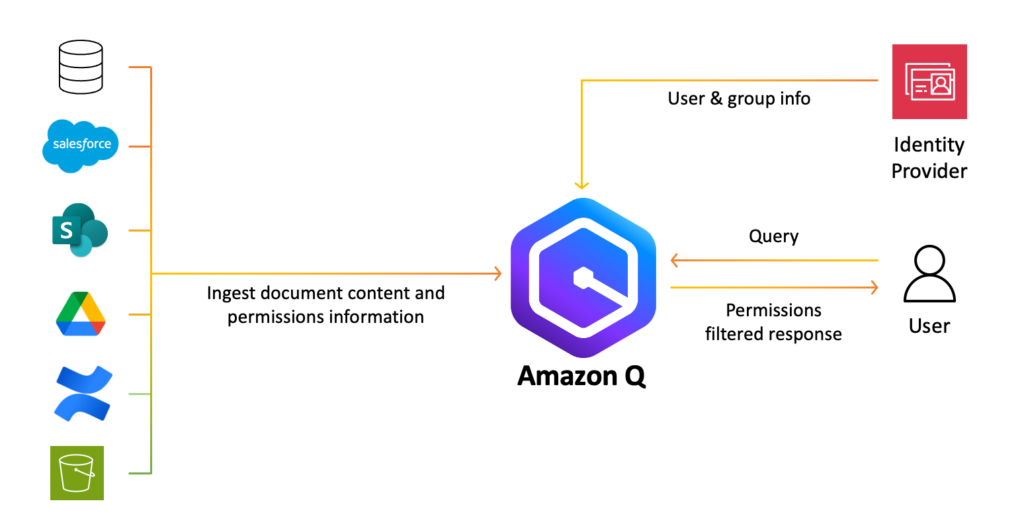
Amazon Q isn’t just another search bar. It’s a permission-aware generative AI assistant designed to act as the “connective tissue” between these layers. It connects to your existing data sources – from S3 and Jira to Salesforce and Microsoft 365 – and indexes them while respecting your existing security permissions.
However, the “right” way to interact with that knowledge depends entirely on who you are and where you do your work. To make internal AI feasible for everyone, we have to look at the three primary paths:
- The No-Code Path: Amazon Q Business
For the majority of the company, the web-based chat interface of Amazon Q Business is the primary “front door.” It allows anyone to ask questions in plain English and receive answers backed by citations. - The Semi-Technical Path: Amazon Q Apps
Sometimes a chat interface isn’t enough. You might need a tool that performs a specific, repeatable task – like “Generate an onboarding checklist from this project’s wiki.” Q Apps allows users to turn a conversation into a lightweight, shareable internal application without writing a single line of code. - The Engineering Path: Kiro IDE, Kiro CLI
An engineer doesn’t want to leave their terminal to go to a browser-based chat just to check a deployment protocol. By integrating Kiro CLI or the Amazon Q extension in the IDE, developers can query the company’s knowledge base directly from their workspace.
It is important to note that Amazon Q is currently evolving into Amazon Quick Suite, shifting the focus from answering questions to ‘agentic’ teammates that proactively automate research and workflows.
Implementation: How Each Path Works
To move from “Fragmented Data” to “Instant Action,” you need to understand the mechanics of each implementation. It isn’t just about where the chat box lives – it’s about how the AI accesses your data and stays within your company’s guardrails.
1. The No-Code Path: Amazon Q Business
Best for: Broad accessibility and ending the “Search Fatigue.”
The goal of Amazon Q Business is to remove the friction of finding information. It doesn’t require users to learn a new interface because it meets them in their existing workflow via Extensions.
- Ubiquitous Access: Through Browser Extensions (Chrome, Firefox and Edge) and direct plugins for Slack, Microsoft Outlook, and Teams, employees can query the company knowledge base without ever leaving their email or chat threads.
- Massive Connectivity: With over 40 pre-built connectors, Q indexes everything from “The Truth” (SharePoint, Confluence, S3) to “The Context” (Slack, Gmail, Microsoft Exchange). It even bridges the gap to structured data in Amazon QuickSight, allowing non-technical users to ask for visual data insights using natural language.
- Personalized & Secure: By integrating with your Identity Provider (IdP), Amazon Q understands who the user is. It doesn’t just provide a generic answer; it provides a personalized one based on their role, while strictly adhering to the Role-Based Access Controls (RBAC) of the source systems.
2. The Semi-Technical Path: Q Apps & Actions
Best for: Moving from “Knowing” to “Doing.”
This is where the blog post title – Turning Siloed Data into Instant Action – truly comes to life. This path utilizes Amazon Q Actions to perform tasks across your enterprise stack.
- The Action Library: Amazon Q isn’t just a “reader”; it’s a “doer.” It can perform over 50 built-in actions across popular third-party apps. Instead of just asking “What is the status of the customer’s ticket?”, a user can tell Q to “Update the Jira ticket status to ‘In Progress’ and notify the account manager in Salesforce.”
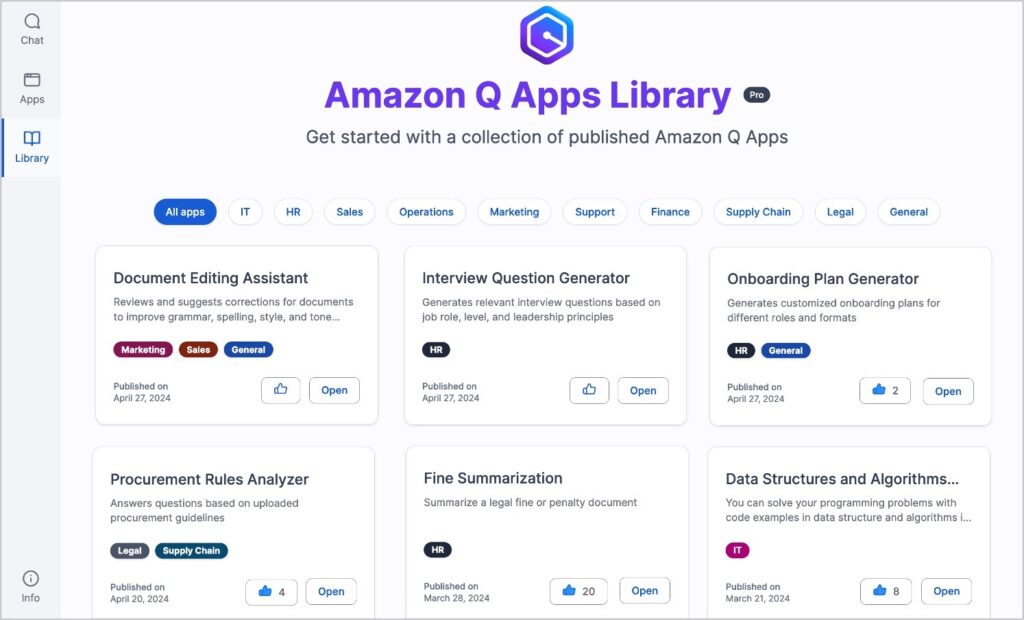
- The Organization App Library: When a power user builds a useful Q App (e.g., a “Product Requirements Doc Generator”), they can publish it to the Company App Library. This allows others to find, duplicate, and customize proven workflows.
- Automated Prompting: Q Apps take the guesswork out of prompting. By creating a structured app, you ensure that every department follows the same logic and uses the same data sources for their outputs, ensuring consistency across the brand.
3. The Engineering Path: Kiro IDE, Kiro CLI and Developer Workflows
Best for: Technical velocity and architectural consistency.
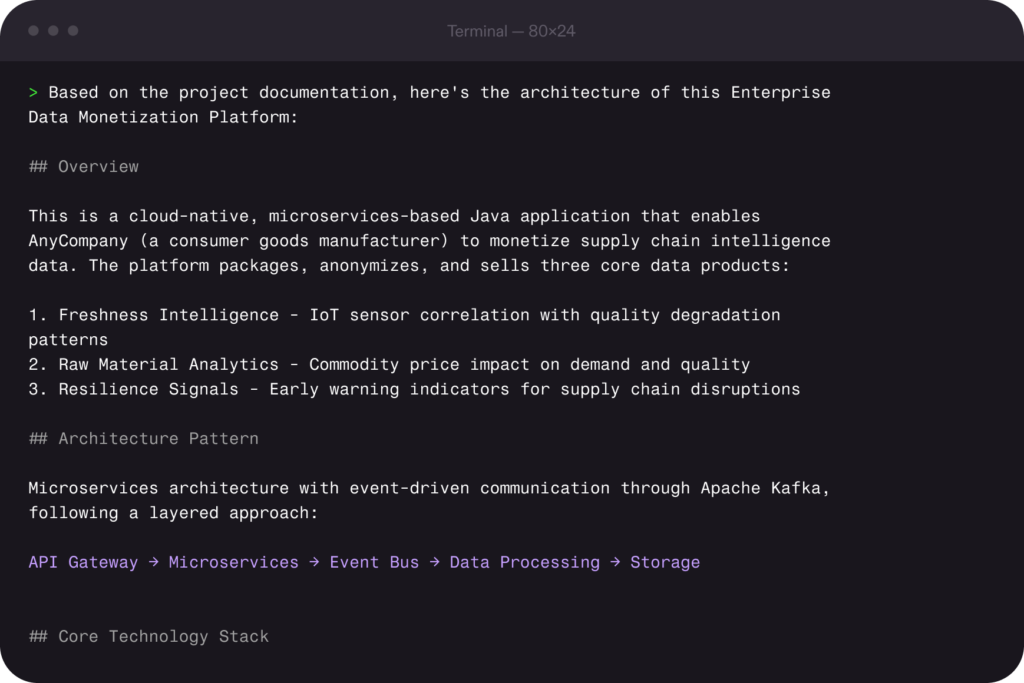
For engineers, internal knowledge isn’t just documentation. It’s code, architecture decisions, deployment patterns, and historical fixes. Kiro brings that same “ask your company” capability directly into the development workflow.
- IDE & Terminal Integration: Just as non-technical users have browser extensions, developers have the Kiro, Kiro CLI and the Amazon Q Visual Studio Code Extension. This allows for “Contextual Chat” where the AI understands the specific line of code you are looking at in relation to the company’s internal documentation.
- Agentic Infrastructure: Leveraging the Model Context Protocol (MCP), Kiro can connect to your infrastructure documentation and live cloud environment. A developer can ask, “Why did the staging build fail?” and Kiro will cross-reference the CI/CD logs with the internal “Deployment Troubleshooting” guide to provide a solution – not just a guess.
- Steering Files for Standards: Using Kiro’s Steering Files, leads can codify technical debt policies or architectural preferences (e.g., “Always use DynamoDB for new microservices”). This ensures that the “Instant Action” taken by the AI is always aligned with the company’s long-term technical strategy.
Kiro IDE
Kiro IDE was launched on 17 November 2025 and introduced spec-driven development as an alternative to the wild west-style “vibe coding” that became popular over the past few years. In the spec-driven mode, it first documents the requirements and, based on that, generates a technical design. In the third step it breaks down the work into tasks, which can be triggered one-by-one.
Kiro fully supports MCP, meaning you can use the official MCP servers from your work tools such as Slack, Notion, Confluence, Jira and ClickUp to allow your AI coding assistant to have full context when implementing new features or fixing bugs.
Kiro CLI
For the keyboard-first developers, Kiro CLI offers a very similar experience to the Kiro IDE, supporting MCP tools to bring your company knowledge and tools into the development environment. Kiro CLI also launched on 17 November 2025, but was known as Amazon Q Developer (or Amazon Q CLI) before that – and, earlier still, debuted as Amazon CodeWhisperer on 13 April 2023.
In Kiro CLI, you can create custom agents where each specialized agent can have access to a set of tools, preserving context without loading unnecessary tools for every prompt. Developers can also further customize the experience by creating pre/post-command hooks that trigger agent actions on specific events (e.g., file save, creation, or deletion).
When You Should Build a Custom RAG System
Managed tools like Amazon Q and Kiro cover the vast majority of enterprise needs. However, there is a “Path 4” – building your own Retrieval-Augmented Generation (RAG) system. You should only consider this path if:
- Complex Metadata Requirements: You need to filter results by highly specific, non-standard metadata that managed connectors don’t support.
- Multi-Model Orchestration: You need to swap between different LLMs (e.g., using a high-reasoning model for logic and a faster, cheaper model for summarization) within a single task.
- Extreme Data Residency: Your compliance requirements dictate that data must remain within a VPC-isolated environment and cannot be indexed by a managed service.
If you’re considering custom RAG before exhausting Amazon Q, you’re likely optimizing too early. Read more about RAG in our RAG vs. Fine-Tuning blog post.
Choosing Your Path: The Amazon Q vs. Kiro Matrix
Not every user in your organization needs the same interface to access company knowledge. A recruiter looking for the latest “Work from Home” policy has a very different workflow than a backend engineer trying to understand a legacy microservice.
To turn siloed data into action, you must pick the tool that meets the user where they already work. Here is how the ecosystem breaks down:
| Feature | Amazon Q Business | Amazon Q Apps | Kiro/Kiro CLI |
| Primary User | HR, Sales, Ops, Finance | Project Leads, Power Users | Software Engineers, DevOps |
| Primary Interface | Web Chat / Browser | Component-based App | Terminal / IDE |
| Setup Complexity | Low (Connectors) | Low (Natural Language) | Medium (Config & Steering) |
| Best For | General Q&A across the whole company. | Repeatable workflows (e.g., “Draft a Case Study”). | Technical context and “Spec-Driven Development.” |
| Action Level | Informational | Structured Output | Agentic / Code Execution |
Maturity Model: A Strategic Roadmap
Don’t try to build the “Perfect AI” on day one. Most successful companies follow a Crawl → Walk → Run strategy:
- Stage 1: The Knowledge Index (Crawl): Deploy Amazon Q Business to your most fragmented departments (HR, Sales, Support). Connect your primary wikis and Slack.
- Stage 2: The Workflow Booster (Walk): Introduce Q Apps for recurring tasks and roll out Kiro CLI to the engineering team to reduce technical context-switching.
- Stage 3: The Agentic Enterprise (Run): Implement advanced Kiro Steering files to enforce architectural standards and evaluate Custom RAG for specialized, high-security data sets.
Need help getting started? We offer a free AI Readiness Assessment until 1 April 2026 – no catch, no commitments required! Book a slot with our team.
Measuring ROI for Internal Knowledge AI
Internal knowledge AI moves quickly from “nice to have” to measurable impact when you track the right signals.
For many stakeholders, “better knowledge sharing” feels like a soft metric. However, by 2026, the data from early Amazon Q and Kiro implementations has provided concrete benchmarks for success. You should track ROI across three key pillars:
1. Operational Efficiency (The “Non-technical” Win)
- Search-to-Resolution Rate: Measure the percentage of internal queries resolved by the AI without escalating to a colleague.
- Onboarding Velocity: Use case studies like Deriv, which saw a 45% reduction in onboarding time by allowing new hires to self-serve answers from the company wiki.
- Meeting Reduction: In release management, companies have reported shrinking 2-hour sync meetings down to 30 minutes (a 75% savings) by using AI to summarize changes and affected customers beforehand.
2. Developer Productivity (The “Engineering” Win)
- Documentation Overhead: Engineering teams using Kiro CLI or IDE extensions have seen a 75% reduction in time spent updating and searching for technical docs.
- Modernization Speed: Large-scale tasks, such as JDK migrations, that previously took 3 to 4 weeks of manual effort can now be completed in as little as 9 hours using AI-driven transformation agents.
- Acceptance Rate: Track the percentage of AI-suggested code or architectural decisions that are accepted by senior devs – a high rate (typically 30%+) signals high trust and context accuracy.
3. Knowledge Retention (The “Risk” Win)
- Tribal Knowledge Capture: Measure the “Knowledge Reuse Rate” – how often older documentation or Slack discussions are surfaced to solve current problems. This mitigates the risk of “Brain Drain” when key employees leave.
Final Thoughts: Start Simple, Scale When Needed
The most common mistake companies make with internal AI is overengineering on day one. They attempt to build a custom, multi-model RAG system before they’ve even indexed their most basic Google Drive folders.
Internal knowledge is only an asset if it’s accessible. By leveraging the Amazon Q ecosystem, you aren’t just building a search engine; you’re building a collective brain that makes every employee as informed as your most tenured veteran.