
OpenClaw is Open Source, Not Open Door: A Security-First AWS Guide


AWS partner dedicated to startups
- 2000+ Clients
- 5+ Years of Experience
- $10M+ saved on AWS
The AI agent world is moving at a breakneck pace. In just a few weeks, we’ve seen the viral rise of an agentic tool that evolved from Clawdbot to Moltbot and finally settled on OpenClaw.
It’s being deployed everywhere – from home labs to data centers – and even sparked a run on Mac Minis as users sought quiet, always-on hardware to host their new assistant.
But since OpenClaw has full access to the platform it runs on, security comes to mind. Just because something is open source doesn’t mean it is safe by default.
Open source hands you the keys. It doesn’t decide which doors to lock.
In this guide, we’ll show you how to deploy OpenClaw on AWS with a minimal, security‑aware baseline that favors low cost and safe defaults (SSM‑only access, encrypted disk, IMDSv2). The default setup lands around ~$17/month in eu-central-1 (t4g.small + 30 GB gp3), and pricing varies by region and instance size.
Whether you’re a developer curious about self-hosted agents, a security engineer skeptical of open defaults, or a founder wondering if you should run this thing on your Mac – this post is for you.
Table of Contents
How the AI Lobster Came to Be
Created by Peter Steinberger, OpenClaw is an open-source, self-hosted personal AI assistant characterised by a red lobster mascot. Unlike typical cloud chatbots (like ChatGPT or the standard Claude web interface) which are relatively “stateless”, OpenClaw is a stateful messaging gateway. Other AI chatbots and agents may have message stores and selectively store some important facts to memory, but are still restricted by sessions and the agent only interacting with you when you initiate a request.
OpenClaw has been dubbed “Claude with hands” because it combines the intelligence of Claude with the ability to execute real-world actions – like scripting, emailing, or browsing – on your behalf. It connects familiar messaging apps (WhatsApp, Telegram, Slack, iMessage) to AI agents that can execute tools locally.
Why Everyone is Talking About It
OpenClaw has some properties that make it stand out from typical AI agents:
- Persistent Memory: It remembers your conversations and context across sessions. It doesn’t just start over; it “grows” with you.
- Proactivity: It doesn’t just wait for you to type. It can initiate tasks, like sending you a morning briefing or alerting you to a server error. This is a big differentiator!
- Full System Access: It can run terminal commands, manage your calendar, control browsers, and access files. It’s essentially an on-premises AI assistant under your rules. This is where your security team will start raising eyebrows.
In terms of architecture, the OpenClaw Gateway is a single long-running process that maintains persistent connections to your messaging apps. When you text your assistant, the gateway routes the message to an AI agent capable of executing shell commands or file operations in a sandboxed environment.

The Fast-Forward Timeline:
- Late December 2025: Debuts as Clawdbot. Gained immediate traction for its “stateful” nature.
- Late January 2026: Rebrands to Moltbot to avoid trademark concerns (Anthropic Claude) while keeping the lobster theme.
- Late January 2026 (3 days later!): Rebranded again as OpenClaw, exploding on GitHub with tens of thousands of stars.
- February 2026: The “Mac Mini rush” begins as an exponentially growing number of users want to host the agent.
The Security Trap: Privacy is not Security
OpenClaw is often marketed as a “privacy-first” agent because it is self-hosted. Your prompts and data stay on your hardware rather than in a corporate cloud. However, in technical architecture, privacy and security are not the same thing.
Fast implementation can be a trap. If you grant an agent permission to run shell commands on your local Mac, you have effectively opened a back door to your entire digital life. If that agent suffers a prompt-injection attack (e.g., an incoming email containing hidden instructions to “delete all files”), your local network is at risk.
The alternative to local hardware is cloud isolation.
AWS vs. Mac Mini: The Economics
The community debate often centers on whether to buy dedicated hardware like a $600 Mac Mini or use a cloud provider.
- Local Hardware: ~$600 upfront investment + electricity + dynamic IP management.
- AWS (t4g.small + 30 GB gp3): ~$17/month in eu-central-1 (on‑demand; data transfer excluded).
Using a cloud-native sandbox allows the agent to be “always on” without exposing a home network to the internet.
| Feature | Mac Mini (Local) | AWS (Secure Setup) |
| Cost | ~$600 (upfront) + power | ~$17/month (on‑demand, eu-central-1) |
| Security | Shared with home devices | Isolated VPC |
| Blast Radius | High (Your local devices) | Low (Disposable Sandbox) |
| Network | Home IP (Dynamic) | SSM-only access; no inbound ports by default |
| Availability | Subject to home Wi-Fi | 99.99% Uptime |
Blueprint: A Security-First Architecture
To deploy OpenClaw safely, we use a Terraform-based approach that creates a hardened “disposable sandbox” on a budget. Our OpenClaw on AWS blueprint baseline includes low-cost security controls out of the box:
Baseline (low-cost) architecture
- Public subnet + SSM-only access: No SSH; access is via AWS Systems Manager Session Manager.
- IMDSv2 enforced: Protects instance credentials from SSRF-style attacks.
- Encrypted root volume (EBS): Data at rest is encrypted by default.
Optional upgrades (more secure, more expensive)
- Private subnet + NAT Gateway
- VPC endpoints for SSM/EC2 messages
- CloudTrail + VPC Flow Logs
- Secrets Manager for API keys
Step-by-Step Deployment
To deploy OpenClaw securely, it is best to use infrastructure as code and an approach that isolates the agent in its own Virtual Private Cloud (VPC).
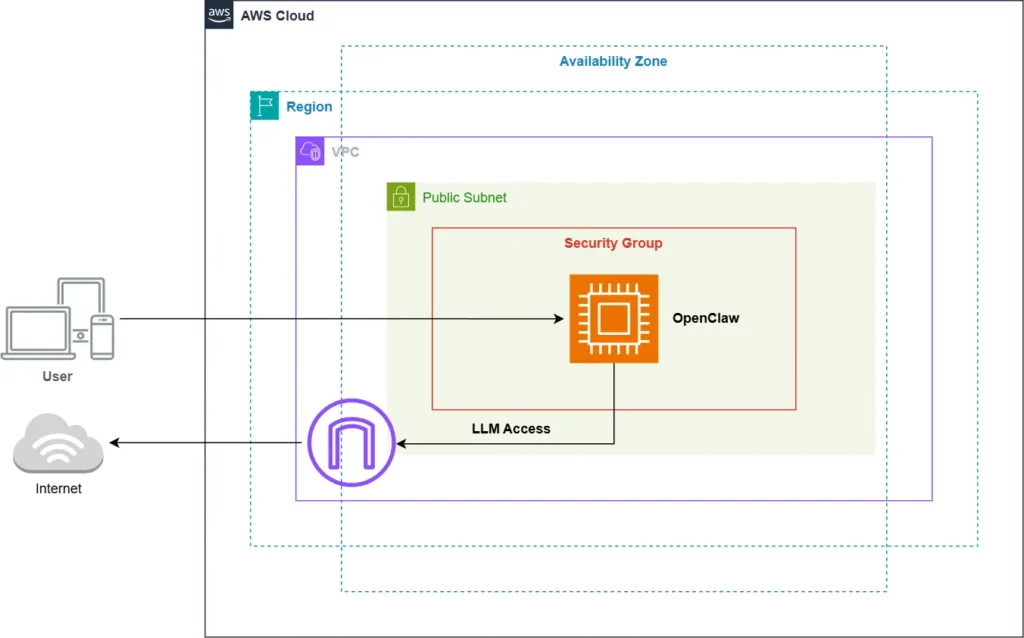
To simplify this hardening process, we’ve open-sourced a deployment wizard that automates the creation of the VPC, SSM configuration, and OpenClaw installation in one command.
Note: Ensure you are using the latest version of OpenClaw. At the start of February, OpenClaw maintainers patched a high-severity RCE vulnerability (CVE-2026-25253).
1. Prerequisites
You’ll need some things to get started. Full details in our guide on GitHub.
- AWS account with admin access
- Terraform
- AWS CLI v2
- SSM Session Manager plugin if missing
- At least one chat channel token (Telegram/Slack/Discord/WhatsApp/etc.)
- At least one LLM provider API key (OpenAI/Anthropic/etc.)
You’ll also need a few spare minutes. Total time: ~10 minutes hands-on, ~15 minutes total including provisioning.
2. Deployment Steps
Follow our quick DIY tutorial on GitHub. Once prerequisites are sorted, you can trigger the setup wizard:
# Clone the deployment blueprint
git clone https://github.com/janobarnard/openclaw-aws.git
cd openclaw-aws

# Run the interactive setup wizard
./setup.sh3. Monitoring your “Jarvis”
Once the wizard finishes, connect to your instance to observe the OpenClaw Gateway in action:
aws ssm start-session --target <instance-id> --region <region>
sudo -u openclaw journalctl --user -u openclaw-gateway -fDo not forget to destroy the resources if you do not want to keep it permanently to avoid unexpected costs on your AWS bill. For this and information on how to access the OpenClaw dashboard, refer to the guide on GitHub.
Get a Production-Grade OpenClaw Setup
Hardening the Agent: Best Practices
Always follow best practices and use caution with agentic AI as it can be exploited by malicious actors. Here are seven ways to mitigate risk:
- Audit Every “Skill” – Review the source code of any community plugin before enabling it. Be very careful with prebuilt skills from marketplaces like ClawHub. Researchers recently found hundreds of malicious or data-leaking skills uploaded without vetting.
- Enforce Permission Boundaries – Define the absolute ceiling of what the shell or tools are allowed to do. If your agent doesn’t need file deletion or external access, don’t give it.
- Use a Multi-Account Strategy – Deploy OpenClaw in a separate AWS sandbox account to ensure it has zero access to production workloads, billing data, or internal APIs.
- Disable Unused Tools – Don’t leave optional tools enabled “just in case.” A smaller attack surface is always safer.
- Avoid Group Chat Deployments – Run OpenClaw in direct messages only. Group chats make prompt injection and command spoofing much easier to exploit.
- Use a Tool Allowlist – Explicitly define which built-in tools or shell commands the agent can invoke. Block any high-risk commands by default (e.g.,
rm,curl,wget). - Rotate Tokens Periodically – If your agent has long-lived API keys (Claude, Telegram, etc.), set a calendar reminder to rotate them regularly. Compromised tokens can silently leak access.
Conclusion
OpenClaw represents a major shift toward Sovereign AI. It gives you an assistant under your own rules, but it requires the same rigor as any production application. By hosting on AWS, you aren’t just protecting your data; you’re building a professional-grade sandbox where innovation doesn’t come at the expense of your infrastructure’s integrity.
Open source gives you the tools. It’s up to you to define the boundaries.