
Opus, Sonnet or Haiku? Meet the Claudes



AWS partner dedicated to startups
- 2000+ Clients
- 5+ Years of Experience
- $10M+ saved on AWS
If you’ve spent any time using Claude – through the chat app, the API, or Claude Code – you’ve probably seen the three names: Opus, Sonnet and Haiku. These names are not just marketing flourishes. The three Claude models map to a real engineering trade-off you make every time you fire off a prompt: how much capability you need, how fast you need it, and how much you’re willing to pay per token.
This post is a practical walkthrough of the current Claude lineup as of May 2026 – what each model is good at, what it costs, and how to pick between them when you’re building something.
The short version
If you remember nothing else:
- Sonnet 4.6 is the default. Almost every production workload should start here.
- Opus 4.7 is for the hard problems where you’ve measured Sonnet falling short.
- Haiku 4.5 is for the simple problems at volume – and it’s a real model, not a toy.
- Pin your model strings. Always.
- Use prompt caching. Always. It’s free money.
The rest of this post unpacks each of those. If you’ve already made up your mind, skip to the cost levers section near the end – that’s where the genuinely overlooked stuff is.
The three-tier mental model
Anthropic settled on the Opus/Sonnet/Haiku naming back in March 2024 with the Claude 3 release (before that, the fast/cheap tier was just called “Claude Instant”), and it’s stuck because it works. The three tiers correspond to a deliberate trade-off curve:
- Opus is the flagship – the most capable model in the family, tuned for the hardest reasoning and the longest-horizon agentic work.
- Sonnet is the balanced middle – fast enough for production, smart enough for most real workloads, and priced to actually deploy at scale.
- Haiku is the speed-and-cost tier – small, quick, cheap, and surprisingly capable for a model in its weight class.
Think of it less like “big / medium / small” and more like “specialist / generalist / sprinter”. Each one is the right answer for a different job.
The current production members of each tier, at the time of writing:
| Tier | Current model | API model string | Released |
|---|---|---|---|
| Opus | Claude Opus 4.7 | claude-opus-4-7 | April 2026 |
| Sonnet | Claude Sonnet 4.6 | claude-sonnet-4-6 | February 2026 |
| Haiku | Claude Haiku 4.5 | claude-haiku-4-5-20251001 | October 2025 |
A small naming note that people often get wrong: it’s “Claude Haiku 4.5”, not “Claude 4.5 Haiku”. Anthropic puts the tier name before the version number. Easy mistake to make on a blog post or LinkedIn caption, and one I’ve definitely made.
One footnote: in April 2026 Anthropic also unveiled Claude Mythos Preview, a frontier model sitting above the Opus tier that’s strikingly capable at cybersecurity tasks. It’s only available as a gated research preview under Project Glasswing – access is limited to a small set of vetted organisations doing defensive security work – so it’s not something you’ll be choosing between for your day-to-day workload. I’ve left it out of the comparison for that reason.
The headline comparison
Here’s the side-by-side. I’ll unpack the meaningful bits below.
| Opus 4.7 | Sonnet 4.6 | Haiku 4.5 | |
|---|---|---|---|
| Positioning | Flagship – hardest reasoning, deepest agents | Default driver – most production work | Speed and cost – high volume, low latency |
| API input price (per 1M tokens) | $5 | $3 | $1 |
| API output price (per 1M tokens) | $25 | $15 | $5 |
| Context window | 1M | 1M | 200K |
| SWE-bench Verified | 87.6% | 79.6% | 73.3% |
| Best at | Multi-step planning, deep refactors, hard reasoning | Coding, analysis, daily agentic work | Classification, routing, sub-agents, high-volume tasks |
A quick note on those prices: they’re the published per-token rates for the Anthropic API. If you’re consuming Claude through Amazon Bedrock or Google Vertex AI, the per-token rates match Anthropic’s, but the bill lands on your AWS or GCP invoice – useful if you’ve already got committed spend or data-residency requirements on those platforms. If you’re using Claude through claude.ai (Free, Pro, or Max) or Claude Code on a subscription plan, you’re paying a flat monthly fee instead, and these numbers don’t apply directly – though they’re still the right reference point for thinking about which model is “expensive” versus “cheap”.
And a quick word on SWE-bench Verified, since it appears in the table and a few times later. It’s a benchmark made up of real bug reports and pull requests from popular open-source Python projects on GitHub. The model is given the bug description and the repo, and has to produce a patch that actually fixes the bug – judged by whether the project’s existing test suite passes. “Verified” means the problems have been human-vetted to make sure they’re actually solvable from the information given. It’s currently the industry’s most-cited benchmark for real-world coding ability, so when you see a Claude model scoring ~80% on it, that means the model produced a working fix on roughly 80% of those real GitHub issues. It’s not a perfect proxy for everything coding-related, but it’s the closest the industry has to one.
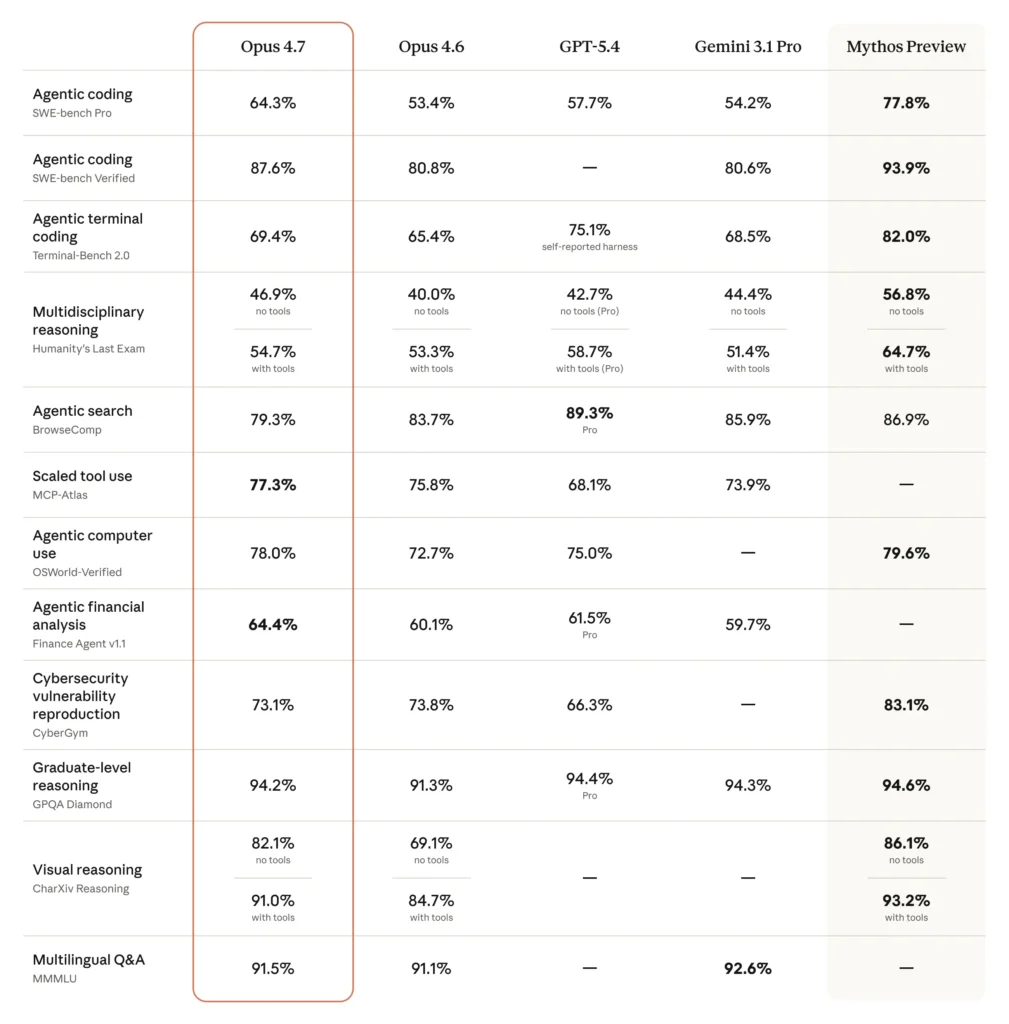
A few things worth keeping in mind:
The output-to-input ratio is 5x across the board. Anthropic kept this consistent across all three tiers, which makes back-of-the-envelope budgeting genuinely easy – multiply your input cost by five and you’ve got your output ceiling. Most other providers have ratios that wobble between 3x and 8x depending on the model.
The Sonnet/Opus gap is wider than it was – but Sonnet is still the right default. With Opus 4.6, Sonnet 4.6 closed the SWE-bench gap to roughly a single point – the smallest gap in Claude’s history at the time. Opus 4.7 reopened it meaningfully, so the two tiers are no longer “almost the same model at different prices”. That said, the routing advice doesn’t actually flip: Sonnet 4.6 is still genuinely strong for the vast majority of production coding work, and Opus 4.7 still costs roughly five times more per token. What changes is the signal for when to escalate – Opus 4.7 buys you a real, measurable capability lift on the hard end of the distribution, not just a marginal one. If you’ve got a workload sitting in that hard end, the escalation is now easier to justify.
Haiku 4.5 is not “the dumb one”. It’s a genuinely capable model that happens to be 5x cheaper than Opus and around 3x cheaper than Sonnet on both input and output. The trade-off is mostly context window (200K vs 1M) and the depth of reasoning it can sustain over long agentic chains.
When to use each one
This is where the rubber meets the road. Forget benchmarks for a second – here’s how I actually think about routing work to a tier.
Reach for Opus 4.7 when…
- You’re doing deep, multi-file refactors where decisions in step 1 cascade through step 47. Agentic work where early errors compound.
- You need frontier-grade reasoning – proof-style problems, hard architectural decisions, novel algorithm design, security analysis on complex code.
- You’re hitting a quality ceiling on Sonnet that prompt engineering can’t fix. This is the real signal – if Sonnet’s output is “almost right but consistently wrong on the hard cases,” that’s an Opus problem.
- Instruction following precision matters – when a small misinterpretation of the spec is expensive downstream.
Opus 4.7 specifically also introduced sharper vision (up to ~3.75 megapixel image input) and a self-verification step that makes it noticeably more reliable on long tool-use chains. If you’re building agents that run for tens of minutes on their own, that reliability premium often pays for itself.
Reach for Sonnet 4.6 when…
- You don’t have a strong reason to reach for anything else. This is the default.
- You’re doing general-purpose coding – writing features, refactoring single files or small clusters, debugging, code review.
- You’re building analysis or RAG pipelines where the 1M context window matters and Opus pricing would be overkill.
- You’re prototyping an agent and want to iterate without burning Opus budget on every test run.
- You’re integrating Claude into a customer-facing product where latency matters. Sonnet 4.6 is faster than Opus in most cases and produces noticeably better tool-calling behaviour than the previous Sonnet generation.
If you take only one thing from this post, take this: start on Sonnet 4.6, and switch only when you’ve measured a real gap.
Reach for Haiku 4.5 when…
- You’re running high-volume, well-bounded tasks: classification, routing, extraction, moderation, tagging, sentiment.
- You’re building multi-agent architectures where a cheap sub-agent handles “which tool should I call?” before the expensive model handles the actual work.
- You need low latency – interactive chat, real-time suggestions, autocomplete-style flows.
- You’re processing a lot of short documents where 200K of context is more than enough.
Haiku does best on well-scoped tasks with clear inputs and a narrow solution space. The more the task requires inferring intent, weighing trade-offs, or reasoning across many steps, the more you’ll feel the gap with Sonnet.
The trick with Haiku is to use it for what it’s good at, not to try to make it punch above its weight. If you find yourself adding 12 examples to the prompt to make Haiku behave correctly on a complex task, you’ve already burned the cost advantage – just use Sonnet.
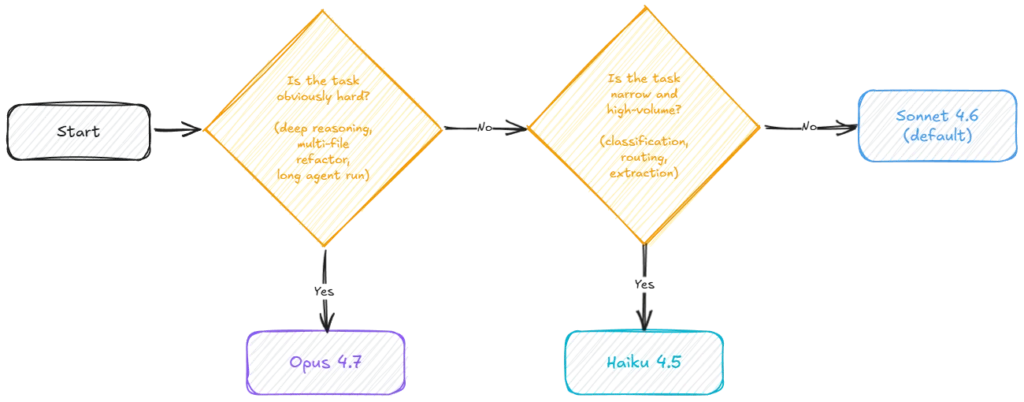
Then measure. If Sonnet is failing at the quality bar, escalate to Opus. If Sonnet is overkill (you're paying for capability you don't use), step down to Haiku and verify the quality holds.A worked example: a typical RAG-ish workload
Let’s say you’re building an internal tool that answers questions over a 50-page document. Embedding-based retrieval surfaces around 8K tokens of context per query. The user expects an answer in under five seconds.
- Haiku 4.5 will handle this comfortably. 200K context is plenty, latency is well inside your budget, and quality on focused Q&A from retrieved chunks is more than acceptable. Cost: roughly $10 per 1,000 queries (mostly input, given the 8K of retrieved context), before any prompt caching.
- Sonnet 4.6 will give you better synthesis, better handling of ambiguous questions, and noticeably better behaviour when the retrieved context is messy or partially irrelevant. Cost: about 3x Haiku.
- Opus 4.7 is overkill here. You’ll pay 5x Haiku for a quality lift the user almost certainly won’t perceive.
The honest answer for most teams: start on Haiku, evaluate on your real data, and step up if quality slips. This is the opposite of the default advice for greenfield prototyping, where Sonnet is the right starting point. For narrow, high-volume RAG, the economics flip.
The cost levers nobody talks about
Two things to know before you finalise your budget projections:
Prompt caching can save up to 90% on repeated input tokens. If you’ve got a long system prompt, a static document set, or a few-shot template that hits on most requests, prompt caching is the single biggest lever you have. For agent workflows where the same toolset and instructions get sent on every turn, this is the difference between “we can deploy this” and “we can’t afford to deploy this”.
Batch processing offers a 50% discount for workloads that don’t need real-time responses. If you’re processing a backlog overnight – categorising support tickets, summarising yesterday’s transcripts, running QA over a corpus – batch is the right shape.
Combine the two and your effective cost on Sonnet 4.6 for a cache-heavy batch workload can land below Haiku’s headline rate. It’s worth modelling.
A note on model versions and pinning
This is the bit that bites people in production: always pin to a fully versioned model string. Use claude-sonnet-4-6, not claude-sonnet. Anthropic does occasionally update the default that generic aliases point to, and you do not want that change to land in your production traffic on a Tuesday afternoon while you’re in a meeting.
Starting with the 4.6 generation, the dateless model IDs (like claude-sonnet-4-6 or claude-opus-4-7) are themselves pinned snapshots – not evergreen pointers. Earlier model strings like claude-haiku-4-5-20251001 carry the explicit release date. Either way, the rule is the same: pin it, and migrate deliberately when you’re ready.
Picking the right Claude is an engineering decision
The thing I want you to walk away with isn’t a specific recommendation – it’s a habit. Picking a Claude model shouldn’t be a vibe check (“Opus feels smarter, let’s use Opus”) and it shouldn’t be a budget reflex either (“Haiku is cheaper, ship it”). It’s an engineering decision, and like any engineering decision it benefits from being made deliberately, with measurement, and revisited as your workload changes.
The three-tier model gives you a clean surface to make that decision on. Three options is few enough that you can actually reason about them. The pricing ratios are consistent enough that you can budget without a spreadsheet. The capability gaps are well-documented enough that you can predict, roughly, where each one will struggle.
A practical rhythm that’s served me well: start every new workload on Sonnet 4.6 unless you have a strong prior to do otherwise. Build the eval suite before you build the feature. Once you’ve got a quality bar you trust, run the same prompts through Haiku and Opus and see what actually moves. Most of the time, Sonnet stays. Sometimes Haiku is good enough and you’ve quietly saved your team three-quarters of the budget. Occasionally Opus is the only thing that clears the bar, and now you know exactly what you’re paying the premium for and why.
That’s the whole game. Three models, one decision framework, and the discipline to measure instead of guess.
Build something good with them.