
Vibe Coding: 7 Powerful Rules for a Successful Startup



AWS partner dedicated to startups
- 2000+ Clients
- 5+ Years of Experience
- $10M+ saved on AWS
Not long ago, building software meant hiring engineers. Then it meant learning to code. Today, for a growing number of founders, it means opening a terminal and talking to an AI agent – yes, in 2026 you can verbally communicate with coding agents.
I’ve watched this shift accelerate in real time through the companies Cloudvisor works with. Founders who would never have touched a codebase are shipping working products – using tools like Claude Code, Kiro and Cursor to turn plain English into infrastructure, APIs, and full-stack applications. The barrier to building has never been lower.
But here’s what I’ve also seen: the vibe coders who move fastest often leave behind the biggest messes. A codebase assembled through rapid-fire AI prompts can look functional on the surface and be structurally terrifying underneath – monolithic, undocumented, untested, riddled with hardcoded secrets. I like to call it the beautiful disaster pattern. It works until it really, badly doesn’t.
The vibe coders who move fastest often leave behind the biggest messes.
This post is my attempt to give you the guardrails before you need them. These seven rules won’t slow you down – if anything, they’ll make you faster in the long run by keeping your codebase in a state that a real engineering team can actually inherit.
Let’s get into it.
The Short Version
- Vibe coding – building software with natural language AI commands – is the fastest way to ship an MVP in 2026.
- Done carelessly, it produces a codebase that will terrify your first engineering hire.
- These 7 rules let you move fast without blowing up your technical foundation.
- Rule 1: Build modular, not monolithic. Rule 2: Ground your AI with real codebase context. Rule 3: Security is not optional. Rule 4: Document as you build. Rule 5: Make the AI write the tests. Rule 6: Review every agentic diff. Rule 7: Know when to hand off.
Table of Contents
What is Vibe Coding?
The term was coined by AI researcher Andrej Karpathy in early 2025 and has since become something of a rallying cry for the no-code/low-code generation. The idea is simple: instead of writing syntax manually, you describe what you want to build in natural language – and an AI agent generates the code, runs it, checks for errors, and iterates. You’re less a programmer and more a director.
In practice, vibe coding today looks like this: a founder opens Claude Code in their terminal and says “Build me a Stripe checkout component that integrates with my existing user schema”. The agent reads their project structure, writes the code, handles the edge cases, and flags what it can’t resolve on its own. In minutes, not hours.
This is genuinely transformative. Tools like Claude Code, Kiro, and GitHub Copilot have moved beyond autocomplete – they’re capable of executing multi-step workflows, reading real repository context, and making architectural decisions. For early-stage founders without a technical co-founder, they’ve become the closest thing to a junior developer who never sleeps.
The risk isn’t that these tools produce bad code. It’s that they produce good-looking code, quickly, without any of the institutional habits – modularity, documentation, testing, security hygiene – that experienced engineers apply instinctively. When you vibe-code without guardrails, you’re essentially building on a foundation of AI best-guesses. Most of the time that’s fine. Until your production application goes down unexpectedly…
Here are the seven rules that change the equation.
The 7 Powerful Rules of Responsible Vibe Coding
Think of these as the engineering habits your AI agent won’t develop on its own – but will happily follow if you ask it to.
Rule 1: Build in Modular Blocks, Not Monoliths
The fastest way to create unfixable technical debt is to ask an AI to “build my app”. Agents are remarkably good at following large, vague instructions – and remarkably good at producing large, tangled results that are nearly impossible to maintain.
The fix is to think in components. Before you prompt anything, decompose what you’re building into discrete, bounded features. Authentication is one block. Payment processing is another. User profiles, notifications, data export – each gets its own isolated module. When you ask your AI agent to build, you ask it to build one thing at a time, with clean inputs and outputs that don’t bleed into adjacent systems.
This matters more with AI-generated code than hand-written code, because the agent won’t naturally resist complexity. It will happily write an authentication function that also handles billing logic and sends emails, if that’s what your prompt implies. You have to be the architect.
The practical rule: never let a single prompt span more than one feature boundary. If you catch yourself asking the AI to “also handle X while you’re at it”, stop. Finish the current module. Open a new prompt.
The Monolith Mess
app.js
└── everything()
    ├── loginUser()
    ├── chargeCard()
    ├── sendWelcomeEmail()
    └── exportUserData()
Modular Mastery
src/
├── auth/
│   └── login.js
├── payments/
│   └── checkout.js
└── users/
    └── export.js
If you want to take this further, look into spec-driven development – writing a short plain-English spec before you prompt anything. You describe the inputs, outputs, and constraints of a module, then hand that spec to the agent as the prompt. The AI stays in scope, you get a document that doubles as documentation, and the two habits (modularity + specs) reinforce each other naturally.
Rule 2: Ground Your Agents in Your Codebase
Here’s the core failure mode of browser-based AI coding: you paste a snippet, get back a snippet, and slowly build a codebase where the left hand doesn’t know what the right hand is doing. The AI invents function names that don’t exist. It duplicates logic that’s already been written. It assumes a database schema that doesn’t match yours. These aren’t hallucinations in the dramatic sense – they’re just the natural consequence of an AI that can’t see your actual project.
The fix is to use a terminal-integrated agent instead of a browser-based one. Tools like Claude Code and Kiro don’t just respond to prompts – they read your actual repository. Claude Code has direct file system access, so before it writes anything, it can inspect your directory structure, read your existing modules, check your schemas, and understand what’s already been built. It doesn’t need to be told what exists; it can look.
Kiro does something similar on the AWS side – it integrates with your codebase and your cloud environment, so it understands what’s deployed, what your Lambda functions actually do, and what IAM roles are in play. The more grounded the agent is in reality, the more coherent and accurate its output will be.
Founder Pro-Tip: Stop copying code from a browser-based chat tool and pasting it into your IDE. Use an agent that runs in your terminal and can see your project. The difference in output quality – and the reduction in “why is it calling a function that doesn’t exist” errors – is significant from the first session.
When starting a new session, make this your opening prompt: “Read the project structure and summarise what you see before we begin”. It forces the agent to orient itself before acting, and it gives you a quick sanity check that it’s looking at the right thing.
Rule 3: Treat Security as a Non-Negotiable
AI agents don’t have a security conscience. They’ll do exactly what you ask – including helpfully hardcoding your Stripe API key directly into your source file if that’s what your prompt implies. Some models will now flag risky patterns before you commit them – but that’s a safety net, not a substitute for judgment.
Two things will ruin your startup’s technical credibility faster than anything else:
1. Hardcoded secrets in version control
The moment you commit a production API key to GitHub – even to a private repo – the clock starts ticking. Leaked credentials have ended companies. The rule is simple: all secrets go into environment variables, always. Make it an explicit instruction every time you ask an AI to write code that touches any external service:
“Do not hardcode any API keys or credentials. Use environment variables via
.envand ensure the.envfile is listed in.gitignore.”
On AWS specifically you would want use Secrets Manager or SSM Parameter Store, not environment variables baked into Lambda configuration. Your AI agent can set this up for you if you ask it to.
2. SQL injection and unvalidated inputs
Early users are creative. Some will test what happens when they put a single quote in your signup form. If your AI-generated database queries aren’t parameterised, the answer could be catastrophic. Add this to every prompt that involves data persistence:
“Implement parameterised queries and input sanitisation for all user-facing data entry points.”
You don’t need to understand the implementation (it helps if you do). You just need to ask for it. The agent will handle it.
The meta-rule: end every major feature prompt with “Now review the code you just wrote for common security vulnerabilities.” It takes 10 seconds and catches a surprising number of issues.
Rule 4: Maintain an AI-Generated “Paper Trail”
The day you hand your repository to a real engineer – whether that’s a CTO hire, a technical co-founder, or a consulting partner – is the day your documentation debt comes due. Codebases with zero documentation get rewritten from scratch. That’s expensive, slow, and demoralising.
The good news: the same AI that built the code can document it. You just have to ask. Make it a ritual: before you close your IDE at the end of a session, run a documentation pass.
Documentation checklist – ask your AI to generate:
- ☐ A
README.mdthat explains what the project does, how to run it locally, and what each major module handles - ☐ A structural breakdown of the database schema – tables, relationships, key fields
- ☐ A list of all third-party API dependencies and what they’re used for
- ☐ Step-by-step environment setup instructions (including any required AWS configuration)
- ☐ Inline comments explaining non-obvious logic – especially anything the AI generated that you don’t fully understand yourself
- ☐ A
CHANGELOG.mdentry for the session, summarising what was added and why
That last one is underrated. A changelog written in plain English – “Added Stripe webhook handler; chose async processing because synchronous handling was timing out under load” – tells the next engineer not just what was built, but the reasoning behind architectural decisions. That context is irreplaceable.
Bonus: commit discipline. Vibe coding makes it easy to ship a lot and commit nothing. Resist this and use Git properly. Small, descriptive commits – even if the commit message is AI-generated – create an audit trail that makes debugging dramatically easier. Prompt your agent: “Write a descriptive git commit message for the changes we just made.”
Rule 5: Implement the “Verify the Vibe” Testing Protocol
Here’s the trap: the AI writes code that looks correct, runs without errors, and does what it’s supposed to do – right now. The problem is next month, when you add a new feature that silently breaks the old one. Without tests, you won’t know until a user tells you.
You don’t need to understand how to write unit tests. You need to tell your agent to write them. After every meaningful feature, run a second prompt:
“Write integration tests for the feature we just built. Cover the happy path, at least two edge cases, and any error states that could break downstream functionality.”
This is not about test-driven development in the purist sense. It’s about having a minimum safety net that catches regressions before they reach users. Even a modest test suite – 20 to 30 tests covering your core user flows – will save you hours of debugging as the codebase grows.
As a bonus, the act of asking the AI to write tests often surfaces bugs in the code it just wrote. The testing prompt forces the agent to think through edge cases it may have glossed over during implementation. Think of it as a cheap second opinion.
Minimum viable test coverage for an MVP:
- Authentication flow (login, logout, failed login)
- Core user action (whatever your product’s primary job is)
- Payment or data submission (anything that touches money or user data)
- Error handling (what happens when an upstream API is unavailable)
Rule 6: Leverage Agentic Workflows Safely
There’s a meaningful difference between an AI that writes code when you ask, and an AI that takes multi-step actions autonomously – reading files, editing them, running tests, fixing errors, and committing changes, all in a loop without you in the middle. The second category is called an agentic workflow, and it’s where productivity gains become exponential.
Tools like Claude Code in autonomous mode can take a high-level instruction – “Refactor the authentication module to use JWT instead of session tokens, run the tests, and fix any failures” – and execute it as a multi-step plan. This is genuinely powerful. It’s also genuinely risky if you let it run without oversight.
The failure mode is subtle: you give the agent broad file-edit permissions, check back 20 minutes later, and find it’s made 40 changes across 12 files – some of them correct, some of them solving a problem in a way that creates three new ones. Because each individual step looked reasonable, the cumulative drift is hard to catch.
The safeguard: review every diff before you accept it.
Make it a rule that no agentic workflow runs without a git diff review before the changes are committed. In Claude Code, this means working in a branch, letting the agent do its work, then running git diff main and actually reading what changed. You don’t need to understand every line – you need to spot structural changes (new dependencies, deleted functions, schema alterations) that warrant a closer look.
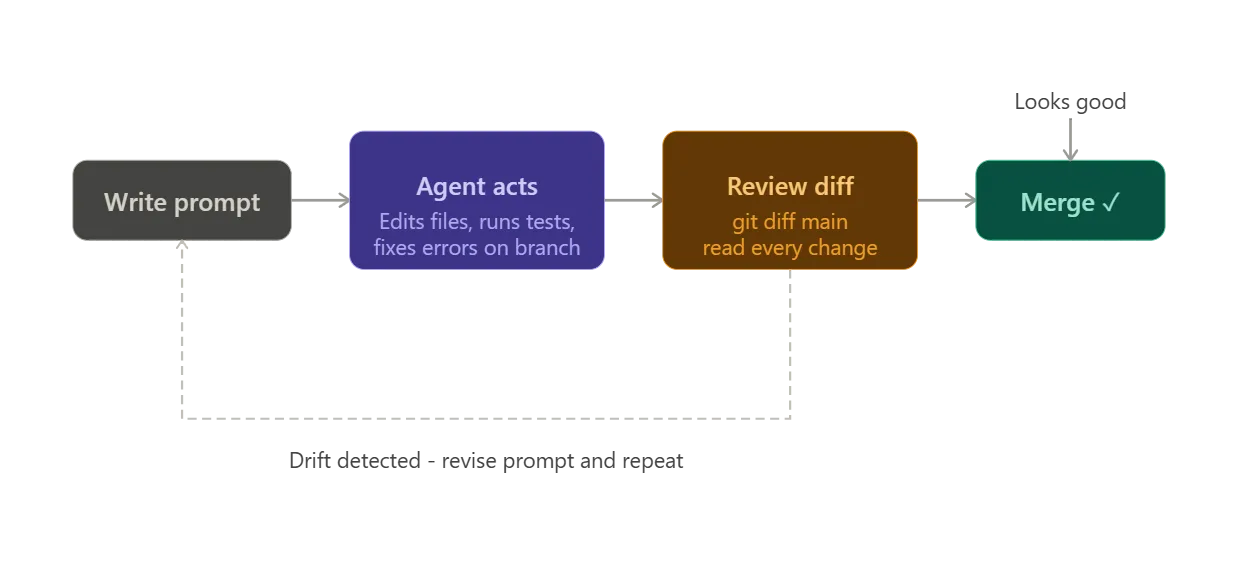
Specifically, watch for:
- Deleted functions the agent decided were “redundant” – they may have been called somewhere you didn’t see
- New third-party package additions – understand what you’re importing before it goes to production
- Changes to database migration files – these are often irreversible
- Modifications to IAM policies or infrastructure-as-code – on AWS, a changed permission can have blast radius you won’t discover until something fails at 2am
The rule of thumb: grant the agent write access to code, but make yourself the merge gate.
This is also where Model Context Protocol (MCP) enters the picture. MCP is the open standard that lets agentic workflows reach beyond your codebase and connect to external systems – your database, your project management tools, your AWS environment, third-party APIs. When an agent isn’t just reading your repo but also querying your production RDS instance or pulling context from Jira, the blast radius of a runaway workflow gets significantly larger. The diff-review discipline becomes even more important when MCP-connected tools are in play.
Rule 7: Know When to Drop the Mic (The Handoff Trigger)
Vibe coding is the right tool for a specific stage of the startup journey. It’s extraordinary for validating market demand, shipping your first 100 paying customers, and iterating on product-market fit. It is not the right tool for everything, indefinitely. Part of building responsibly is knowing where the limit is.
Here are the signals that tell you it’s time to bring in a dedicated technical partner or CTO:
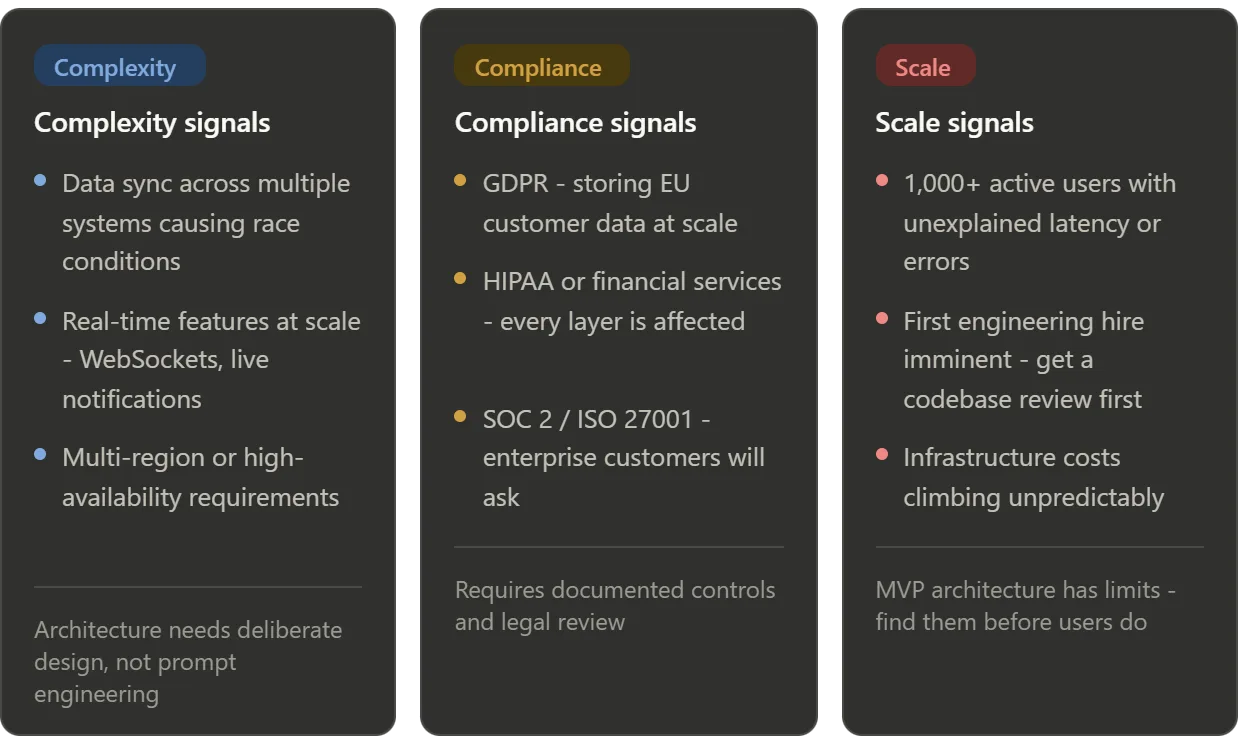
Complexity signals
- Data synchronisation across multiple systems – when you have two or more services that need to share state and the agent keeps introducing race conditions, you need an engineer who understands distributed systems.
- Real-time features at scale – WebSockets, live notifications, streaming – these work fine at low volume. When you hit hundreds of concurrent users, the architecture needs deliberate design.
- Multi-region or high-availability requirements – AWS makes it easy to describe this stuff. It’s much harder to implement it correctly.
Compliance signals
- GDPR data handling – once you have EU customers and are storing personal data at any meaningful scale, the data architecture decisions need legal and technical review.
- HIPAA or financial services compliance – if you’re in health or fintech, compliance requirements touch every layer of your infrastructure. This is not a prompt-engineering problem.
- SOC 2 or ISO 27001 preparation – enterprise customers will ask for this. It requires documented controls and audit-ready architecture that an AI agent won’t produce by default.
Scale signals
- More than 1,000 active users and you’re starting to see unexplained latency spikes or error rates – your MVP architecture probably has bottlenecks that weren’t visible at lower load.
- A meaningful engineering hire is imminent – before your first real engineer joins, have a technical partner review the codebase. The cost of that review is far lower than the cost of re-onboarding an engineer who quits because the codebase is unmaintainable.
- Infrastructure costs are climbing unpredictably – this is almost always an architecture problem, not a configuration problem. An AWS Well-Architected Review at this stage pays for itself quickly.
The handoff isn’t a failure. It’s the natural maturation of a startup that validated with AI speed and is now ready to build for durability.
The Vibe Coding Spectrum
At this point, it’s worth stepping back and looking at the difference between irresponsible and responsible vibe coding side by side. The table below captures the key axes:
| Feature / Scenario | Irresponsible Vibe Coding (The Danger Zone) | Responsible Vibe Coding (The Startup Superpower) |
|---|---|---|
| Prompting Style | “Build me an e-commerce app with checkout.” | “Generate a modular Stripe checkout component for my existing page schema.” |
| Security Hygiene | Pasting raw production API keys directly into the prompt or source file. | Environment variables via .env, secrets in AWS Secrets Manager, input sanitisation enforced. |
| Agent Context | Copy-pasting snippets from a browser tab, no awareness of the actual codebase. | Terminal-integrated agent (Claude Code, Kiro) with direct file system access – reads your repo structure before acting. |
| Documentation | Zero docs. Only you know how it works – and you’re starting to forget. | AI-generated READMEs, schema breakdowns, and changelogs maintained session by session. |
| Testing | Manual “does it look right” checks. New features silently break old ones. | AI-written integration tests covering core flows, run after every major feature. |
| Future Handoff | Codebase must be rewritten before a real engineer can work with it. | Clean git history, documented architecture, modular structure. Readable from day one. |
Make the Rules Stick: Persistent Instruction Files
Here’s the honest problem with the seven rules above: remembering to include all of them in every prompt is its own cognitive overhead. In practice, you’ll follow them diligently for a week and then forget to ask for tests when you’re moving fast, or skip the security review prompt when you’re trying to ship before midnight.
The solution is to encode your rules into a persistent instruction file that your agent reads automatically at the start of every session – so the guardrails are always on, without you having to think about them.
In Claude Code, this file is called CLAUDE.md. Place it in the root of your project and Claude Code will read it every time it starts a session in that directory. Kiro has the equivalent concept built in as Steering Files. Cursor uses .cursorrules. The filename differs by tool, but the idea is the same across all of them: a plain-text file of standing instructions the agent treats as always-on context.
A CLAUDE.md that encodes the rules from this post might look like this:
# Project Instructions

## Architecture
- Never span more than one feature boundary per prompt. Build one module at a time.
- Each module must have clearly defined inputs and outputs with no shared state.

## Security
- Never hardcode API keys or credentials. Always use environment variables via .env.
- Ensure .env is listed in .gitignore before writing any secret references.
- Use AWS Secrets Manager for any secrets used in deployed infrastructure.
- Implement parameterised queries and input sanitisation for all user-facing data entry.

## Testing
- After every feature, write integration tests covering the happy path, two edge cases, and error states.

## Documentation
- After every session, update the README and add a CHANGELOG entry explaining what was built and why.
- Write a descriptive git commit message for all changes made.

## Code Review
- Before finishing any session, review the code written for common security vulnerabilities.This is not a complete list – tailor it to your stack, your team, and the specific rules that matter most for your product. Adapt it over time as you need to. The point is that once it’s written, you stop relying on memory. The agent follows the rules because they’re in its context, not because you remembered to ask.
When to use a docs folder instead
A persistent instruction file is the right place for rules and behaviours – short directives that should always apply. It’s the wrong place for reference material that the agent needs to read and understand in depth.
If your project has an API schema, a data model, an architecture overview, or a set of coding conventions that run to several pages, those belong in a /docs folder (or a /specs folder if you’re working in Kiro’s spec-driven workflow). Keep them as separate, well-named files. When you need the agent to work with that context, reference it explicitly: “Read docs/data-model.md before writing any database queries.”
The rule of thumb: if it’s an instruction, it goes in your persistent instruction file. If it’s reference material, it goes in docs and you pull it in when relevant. Mixing the two – dumping your entire architecture document into CLAUDE.md – bloats the agent’s context on every prompt and dilutes the instructions that actually need to be followed consistently.
Conclusion: Vibe Fast, Scale Right
Vibe coding is one of the most significant shifts in software development in a decade. For founders without a technical background, it genuinely levels the playing field – turning ideas into working products at a speed that wasn’t possible two years ago. I’m not here to pour cold water on that. Quite the opposite.
The point of these seven rules isn’t to slow you down. It’s to ensure that the codebase you’re building right now – the one that might power a Series A product – doesn’t become the anchor that drags you down six months from when you’re reading this.
Build modular. Ground your agent. Take security seriously from day one. Document as you go. Test the things that matter. Review every autonomous diff. And recognise the moment when the job requires more than AI-assisted engineering.
The goal isn’t to become a programmer. It’s to be a responsible architect – someone who uses AI tools intelligently and knows their limits. That combination, in 2026, is a genuine competitive advantage.