
Profit-First GenAI: FinOps-Driven AI Workloads on AWS



AWS partner dedicated to startups
- 2000+ Clients
- 5+ Years of Experience
- $10M+ saved on AWS
Generative AI (GenAI) is easy to experiment with – and surprisingly easy to make expensive.
A single API call feels cheap and a proof of concept looks harmless, but once GenAI workloads move into production, costs start behaving differently from traditional cloud services. Pricing is token-based, usage is driven by users (and how chatty they are), and architectural decisions directly affect spend in ways that aren’t always obvious.
What begins as innovation can quietly turn into an unpredictable line item on the AWS bill.
The problem is rarely “the model is too expensive.” More often, it’s a lack of visibility, governance, and architectural discipline. Teams launch GenAI features without clear cost attribution, without usage observability, and without guardrails. By the time someone asks, “Why did this spike?”, the answer is buried in aggregated service charges.
This is where FinOps comes in.
FinOps is simply the practice of making cloud costs visible, measurable, and optimizable – aligning engineering decisions with business outcomes. Applied to GenAI, it becomes a powerful framework for designing AI workloads that scale sustainably instead of spiralling financially.
In this post, we’ll look at:
- Why GenAI costs behave differently
- What FinOps means in a generative AI context
- Foundational practices like tagging strategies and naming conventions
- Observability with CloudWatch and OpenTelemetry
- Architecture patterns that reduce unnecessary spend
- A practical GenAI FinOps self-assessment to evaluate your current maturity
The goal isn’t just cost reduction. It’s building profit-first GenAI systems – workloads where cost, usage, and value are deliberately aligned from day one.
TL;DR: Executive Summary
If you’re short on time, here’s a few take-home items to keep in mind when developing AI workloads:
- GenAI costs are unpredictable without visibility into tokens, usage, and architecture.
- FinOps for GenAI means cost attribution, observability, and guardrails – not just cheaper models.
- Tagging, naming conventions, and account separation are foundational.
- Observability (CloudWatch, OpenTelemetry) connects usage patterns to spend.
- Profit-first GenAI is designed for financial sustainability, not just technical success.
Table of Contents
Why GenAI Cost Control Is Harder Than It Looks
Cost optimisation in traditional cloud workloads is relatively predictable. Compute runs for known durations, storage grows at measurable rates and traffic patterns can be forecasted. GenAI doesn’t behave like that – its cost model is fundamentally different and that is where most financial surprises originate.
GenAI Breaks Traditional Cost Models
With EC2 or Lambda, you think in time and resources. With GenAI, you think in tokens – input tokens, output tokens, embeddings, and sometimes tool calls. Cost scales with how much context you send and how verbose the model’s response is. A longer prompt isn’t just more data – it’s more spend.
A feature rollout, internal adoption, or automated workflow can increase inference volume immediately, and the bill scales with it. Prompt length, response size, retries, and agent loops all influence total token usage. Without measuring consumption at the request level, cost growth can outpace visibility.
GenAI doesn’t get expensive because infrastructure is idle. It gets expensive because usage increases.
Why a Simple Prompt Can Consume 10k Tokens
One cost driver that often surprises teams building AI agents is the hidden system prompt. A simple “Hello” prompt can consume 1 000 tokens due to the hidden system prompt. Without going into too many details, a system prompt tells the AI agent many things that it should “remember” for every interaction, such as specific behavioural constraints or formatting rules. These system prompts are sometimes very detailed and can easily make up hundreds or thousands of tokens in extreme cases, especially where determinism becomes important.
System prompts have an appetite for tokens.
So your “Hello” message is sent to the LLM along with several hundreds of words to give the agent additional context and guide it in its response formulation. In an unoptimized agent, this is a money pit.
Similarly, when you add dozens of tools to the AI agent, what gets sent to the LLM each time is your prompt + the system prompt + the tool descriptions. For some tools, descriptions can become quite long and sometimes they include examples to guide the agent on picking the right tool and using it correctly. It’s not impossible that each prompt eats more than 10 000 tokens because of these extra tokens being sent along. We’ll address a method to optimize agents later.
A Real Risk: Shipping Without Cost Feedback
POCs quietly turning into production
Many GenAI features begin as experiments – a chatbot, summarisation tool or classification engine. The proof of concept works, so it gets exposed to more users, leading to more traffic and additional integrations.
What started as a controlled experiment becomes a production workload lacking the financial controls that production requires.
No per-feature or per-team attribution
If you can’t attribute GenAI spend to a specific application or feature, you can’t manage it. Aggregated billing data doesn’t help engineering teams optimise – it only tells finance that something increased.
Why “we’ll optimise later” rarely works
By the time costs are high enough to trigger concern, the workload is already embedded in user workflows and business processes. Rolling back becomes technically difficult.
Optimisation works best when cost visibility exists from the beginning. Without it, GenAI doesn’t just scale technically – it scales financially.
What FinOps Means for GenAI on AWS
FinOps is often misunderstood as a finance-led cost reduction exercise. In reality, it is an operational discipline that ensures cloud spending aligns with business value.
In a GenAI context, FinOps means designing systems where:
- Cost is measurable at the workload level
- Usage is observable in near real-time
- Architectural decisions consider financial impact
- Guardrails exist before scaling
GenAI amplifies the need for FinOps because consumption scales directly with usage. If cost visibility is not built into the system from day one, optimisation becomes reactive.
FinOps in Plain Terms
At its core, FinOps is about three things:
- Visibility: You make costs visible at the right level of granularity.
- Optimisation: You optimise based on real usage signals.
- Continuous operation: You continuously review and adjust as workloads evolve.
For GenAI workloads, this means:
- Knowing which models are being invoked
- Knowing how many tokens are consumed per feature
- Understanding which teams or applications drive usage
Without this visibility, you’re managing cloud spend in aggregate.
Designing for Cost from Day One
In GenAI systems, engineering decisions are financial decisions. From the outset, several design decisions directly influence how your AI pipeline cost scales:
- Model choice directly affects cost per request. Start with a model that is best suited to the task – it might not always be the best model on the market.
- Prompt design influences token consumption. Plan your system prompt and add only what is needed. Avoid overloading prompts unnecessarily – iterate and test to find the balance between reliability and cost.
- Agent complexity multiplies invocation cost. More tools and a longer system prompt add significantly to agent cost. Carefully plan your agent – it will cost less to have less tools and also make life easier for your agent.
- Architecture patterns determine idle versus consumption-based cost. If you are just getting started, a serverless agent and LLM might be more than sufficient. Your architecture can grow with you in the cloud. Have a look at our Bedrock vs SageMaker post to help you in choosing the right architecture.
Profit-first GenAI starts with the assumption that cost behaviour must be understood before scale.
Foundational Controls: Tagging, Naming and Account Structure
Before advanced optimisation, basic FinOps best-practices must be in place.
Tagging Strategy for GenAI Workloads
Tagging is the foundation of GenAI cost attribution. Without structured tagging, model invocation costs, embeddings, orchestration layers, and supporting services blend into aggregated service charges.
For GenAI systems, tagging should not only identify infrastructure components, but also map usage to business context. Every resource involved in a GenAI workload – model endpoints, Lambda functions, vector databases, orchestration services, and storage – should be traceable to a specific application, environment, and workload purpose. This enables cost analysis at the feature level rather than at the service level.
At minimum, enforce tags such as:
ApplicationEnvironmentGenAI:WorkloadGenAI:Model
These tags allow you to attribute cost by feature, team, and model. Evaluate whether your tagging provides enough granularity to attribute cost at the feature or workload level. Once you have your tagging in place, it’s also a good time to think about setting up a cost and usage report. This is a powerful AWS feature that allows you to see an hourly breakdown of your expenses, including tagged resources. Tagging is not just for reporting. It enables accountability, optimisation, and informed decision-making when usage increases.
Naming Conventions That Enable Attribution
Consistent naming helps prevent “mystery endpoints” and orphaned resources. No more “who created this” when proper naming schemes are followed.
For example:
- Clear prefixes for Bedrock workloads
- Explicit SageMaker endpoint names reflecting purpose
- Lambda functions tied to GenAI features
- Vector stores named by application and environment
Names should communicate ownership and purpose at a glance. Don’t overcomplicate the naming, but make sure you can tell the who, what and where by simply looking at the resource name. “Test123” doesn’t age well after six months when no-one knows what it is.
Account and Environment Separation
Separating experimentation from production is essential.
- POCs should not share cost boundaries with production workloads – you want to know what is making money and what expenses are experimental
- Production GenAI systems should have clearly scoped budgets – set up budget alerts per account to ensure your workloads stay within budget
- Shared “AI accounts” quickly become cost blind spots – once your workload is production-ready it should be moved to a dedicated account
Environment isolation improves both governance and clarity. Also, it limits the blast radius to a single account.
Observability as a FinOps Control
Cost data alone is insufficient. Spend must be correlated with AI agent behaviour. Without operational context, a spike in usage is just a number on a billing report rather than a signal tied to a specific feature, release, or user pattern.
What to Measure in GenAI Workloads
At minimum, monitor:
- Model requests grouped by feature or endpoint
- Input token count
- Output token count
- Latency
- Retry rates
- Error rates and throttling
Input and output tokens should be tracked separately as they are priced at different rates. A model that produces verbose responses can inflate output costs significantly. Retries and agent loops must also be visible. Without this visibility, optimisation efforts target symptoms rather than root causes. Silent failures multiply token usage without adding value.
Implementing Visibility with Amazon CloudWatch
Amazon CloudWatch provides foundational observability for GenAI workloads.
Leverage:
- Native service metrics where available
- Custom metrics for token counts per invocation
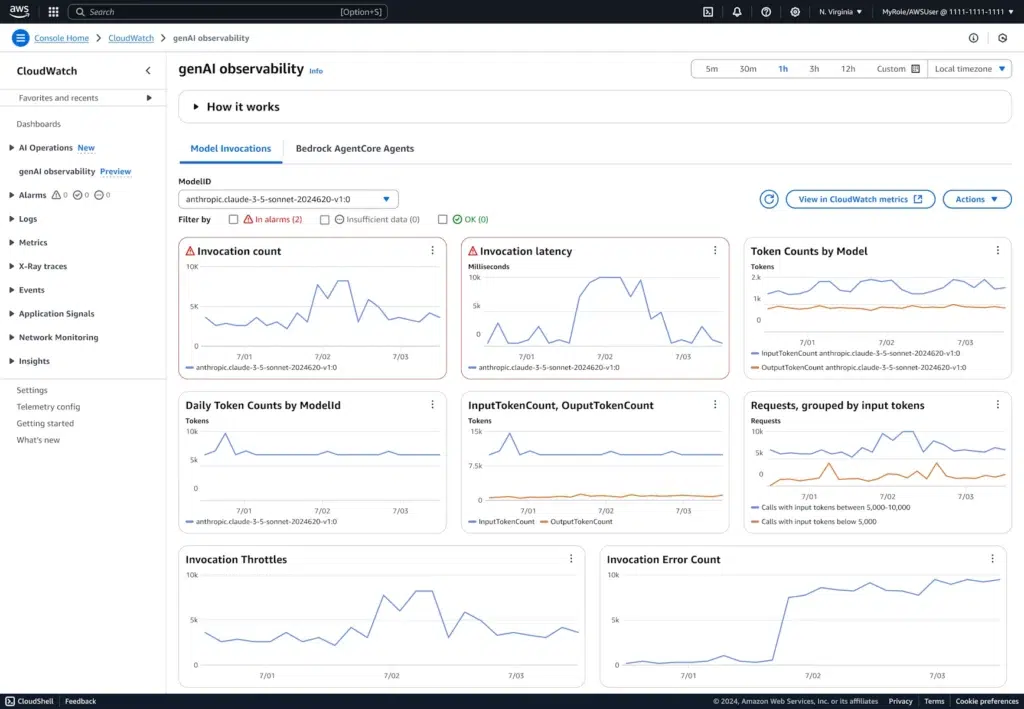
- Aggregated dashboards by application or feature
Consider publishing custom metrics such as:
- Tokens per request
- Cost per feature (estimated from token counts)
- Retry count per workload
Dashboards should align to business use cases, not just infrastructure components. Finance and engineering should be able to see the same story from different perspectives.
Distributed Tracing with OpenTelemetry
GenAI systems rarely consist of a single service. A typical request might pass through an API layer, an orchestration component, a retrieval mechanism, a model invocation, and post-processing before returning a response to the user.
Without tracing, these steps become opaque. You can see total request counts and aggregate cost, but you cannot see how individual user actions translate into model calls and token consumption.
Distributed tracing with OpenTelemetry makes that path visible.
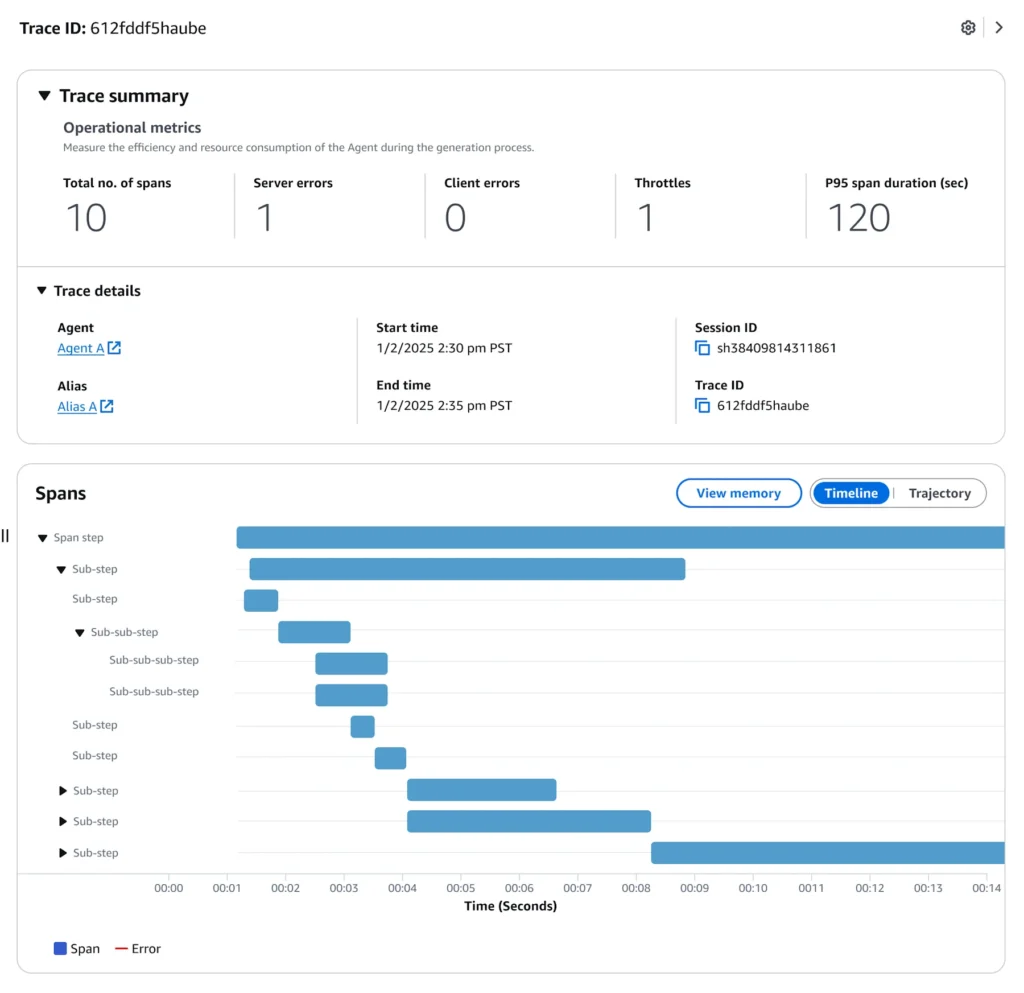
By instrumenting your services and propagating trace context across components, you can follow a single request end-to-end – from the initial user interaction through orchestration logic and model invocation. This allows you to correlate behaviour with cost signals such as token usage, latency, retries, and downstream service calls.
Tracing is not just a debugging tool. In a GenAI workload, it becomes a FinOps capability. When usage spikes, traces help answer critical questions:
- Which feature triggered the increase?
- Did a new release change prompt size or model selection?
- Are retries or agent loops inflating token consumption?
Instead of seeing a cost increase in isolation, you see the behavioural chain that caused it.
In the dashboard below, we’ll look at an example of CloudWatch visualising OpenTelemetry spans, showing how model invocations and orchestration steps can be observed as part of a single traced request.
Cost-Optimised GenAI Architecture Patterns
Cost optimisation in GenAI is primarily architectural.
Model Selection as a Cost Lever
Not every task requires a large, premium model. Use smaller or cheaper models for classification, extraction, summarisation and simple transformations. Or use dedicated AWS services like Rekognition, Textract and Translate to ensure deterministic behaviour. More on this in our Bedrock vs SageMaker post.
Reserve larger models for complex reasoning, multi-step orchestration and high-value business logic. Mixing models within a single application can significantly reduce average cost per request – the advent of Agent2Agent protocol and other multi-agent developments means you can have multiple agents that are experts in their domain working together. In this case you can use a model that’s just the right fit for the needs of each agent.
Reducing Token Consumption with Caching
In many GenAI workloads, the same prompts or contextual data are processed repeatedly.
If identical or near-identical inputs are sent to a model multiple times, you are paying for the same token processing repeatedly. This is especially the case with system prompts and tool descriptions remaining the same for each agent interaction. Caching can significantly reduce this waste.
Common caching strategies include:
- Caching full model responses for repeated queries
- Caching embeddings to avoid regenerating them
- Caching static system prompt and tool description components
- Storing retrieved context separately instead of re-sending large blocks unnecessarily
Caching does not eliminate inference cost, but it reduces redundant token consumption and improves cost predictability. Also, some Amazon Bedrock models support caching – cached tokens are significantly cheaper than input and output tokens.
In high-traffic systems, even small reductions in average token usage per request can translate into substantial monthly savings. Caching also significantly reduces latency and improves the user experience.
Serverless and Event-Driven Inference
Where possible, favour consumption-based patterns.
- Bedrock serverless inference eliminates idle GPU costs
- Lambda-triggered workflows scale with usage
- Asynchronous processing reduces real-time pressure
Avoid always-on GPU endpoints for workloads with sporadic demand.
Guardrails That Prevent Bill Shock
Guardrails convert risk into controlled behaviour. Generative AI should not be put into production without guardrails that limit both misuse and uncontrolled cost escalation.
Implement:
- Rate limits
- Timeouts
- Maximum prompt size constraints
- Budget alerts scoped to GenAI services
Guardrails should be proactive, not reactive. Cost control mechanisms should trigger before the monthly bill does.
A Practical GenAI FinOps Self-Assessment
Before optimising further, ask a simple question: Are your GenAI workloads financially production-ready?
Use the following framework to assess your current maturity.
1. Visibility – Do You Know Where the Money Is Going?
- Can you attribute GenAI spend per application or feature?
- Do you know which models are being used and why?
- Can you separate development and production GenAI costs?
- Are cost allocation tags enabled and enforced?
If GenAI costs appear as a single aggregated line item, visibility is insufficient.
2. Architecture – Are You Paying for Idle Capacity?
- Are always-on endpoints running for low-volume workloads? Could serverless inference reduce idle cost?
- Are large models being used for simple tasks?
- Are retries and agent loops multiplying token usage?
Architecture choices directly influence financial exposure.
3. Observability – Can You Connect Usage to Spend?
- Are token counts tracked per feature?
- Are retries and failures visible?
- Can you trace user actions through to model invocation?
- Can you correlate spikes in usage with cost increases?
Without correlation, optimisation becomes speculative.
4. Guardrails – Do You Have Financial Safety Nets?
- Are budgets defined for GenAI services?
- Do alerts trigger before abnormal spikes escalate?
- Are prompt sizes bounded?
- Are rate limits and timeouts enforced?
Scaling usage without guardrails scales risk.
Interpreting Your Results
If several answers are “no” or “not sure,” your GenAI workload likely has financial blind spots. If most answers are “yes,” you are operating GenAI as a managed product rather than an experiment.
Profit-first GenAI is not about spending the least. It is about spending deliberately.
Building GenAI That Scales Financially
GenAI should be treated as a product capability, not a demo.
Production-grade AI requires:
- Measured cost behaviour
- Clear ownership
- Continuous optimisation
- Observability aligned with business value
Models evolve, pricing changes and usage patterns shift – you need to be prepared. Profit-first GenAI is not a one-time architecture decision – it is an ongoing discipline.
When cost, usage, and value are deliberately aligned, GenAI stops being a financial risk and becomes a controlled, scalable capability that delivers measurable business impact.