
Beyond the Chatbot: Turning AI into an "Employee" with Agentic AI



AWS partner dedicated to startups
- 2000+ Clients
- 5+ Years of Experience
- $10M+ saved on AWS
The first wave of Generative AI (GenAI) was all about conversation. We marveled at chatbots that could summarize emails or write poems. But for startups and scale-ups, “talking” isn’t enough. To get a real return on investment, AI needs to move from the chat window to the workflow.
It’s time to stop thinking about AI as a librarian you talk to, and start thinking about it as an “AI Employee” that gets things done. This shift is called Agentic AI.
TL;DR: The “AI Employee” Cheat Sheet
Don’t have time for the full deep dive? Here is how to move from passive chatbots to autonomous AI agents on AWS:
- The Concept: Shift from LLMs as “chatbots” to AI Agents as “employees” that use an Agent Loop (Reason, Act, Observe) to execute real-world tasks.
- The Knowledge: Use Retrieval-Augmented Generation (RAG) via Bedrock Knowledge Bases to ground your agent in your private company data, reducing hallucinations.
- The Action: Connect agents to your systems using Model Context Protocol (MCP) or Action Groups to give them “hands” to perform tasks like querying databases or sending emails.
- Host your Agent in the Cloud:
- Amazon Bedrock Agents: Best for rapid, no-code deployment of standard workflows.
- Amazon Bedrock AgentCore: Best for code-driven, complex agents requiring long-term memory, hardware-level isolation (Firecracker microVMs), and multi-framework support (Strands, LangGraph).
- The Fast Track: Use the Cloudvisor Quick Deploy guide to launch a RAG agent stack in your AWS account in under 10 minutes.
Table of Contents
What Exactly is an AI Agent?
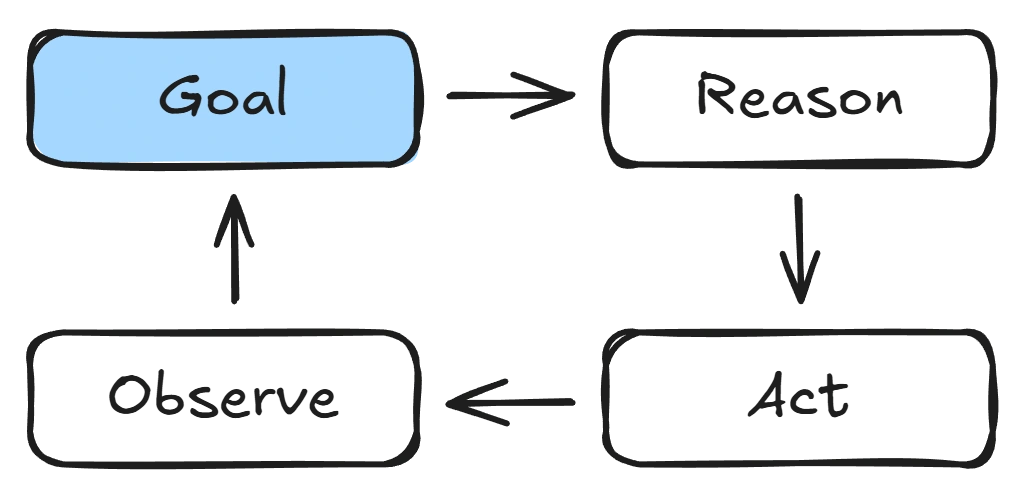
Before we get to the fun part of building an AI agent, there are some concepts to grasp. If a standard chatbot is a passive tool that waits for a prompt, an AI Agent is a proactive system with “agency”. It doesn’t just process language; it follows a cycle known as the Agent Loop:
- Reason: The agent analyzes your request and plans the necessary steps.
- Act: The agent uses “tools”- like checking a database, calling an API, or running code – to gather information or perform a task.
- Observe: It looks at the result, checks for errors, and decides if more steps are needed.
What’s Under the Hood? (LLMs vs. Agents)
Underneath every AI Agent is a Large Language Model (LLM) – the same type of AI that powers modern chatbots. An LLM is trained on vast amounts of text to understand and generate human language.
An LLM is the brain.
An AI Agent is the employee.
On its own, an LLM is exceptional at reasoning and communication. It can explain a process, summarize a document, or suggest what should happen next. But it can’t take initiative, access your systems, or verify that work was actually completed.
An AI Agent wraps that LLM in structure and permissions:
- Memory to retain context over time
- Tools to interact with real systems
- Logic to decide what to do next
- Feedback loops to check whether the task is complete
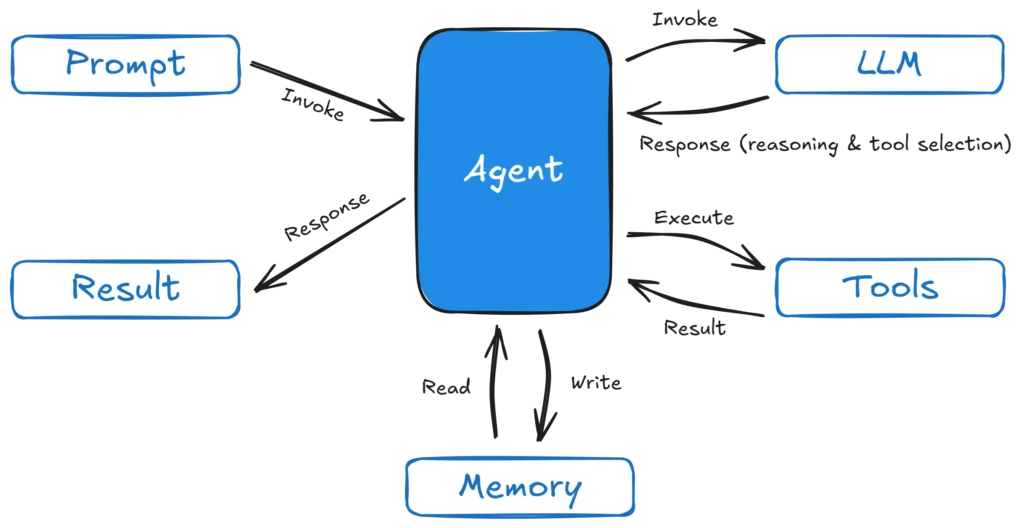
In other words, agents don’t replace LLMs – they operationalize them.
There are plenty of LLMs on the market right now. Amazon Bedrock provides several models from major AI companies like Anthropic, OpenAI, Google, Meta, Qwen, and Amazon too. Popular LLMs include the Claude Sonnet family, Meta Llama and the Amazon Nova & Titan families.
Many of the Bedrock models are available under a serverless pricing model, so you only pay for the number of tokens you use. The popular Claude Sonnet 4.5 model costs $0.003 per 1 000 input tokens and $0.015 per 1 000 output tokens. The Amazon Nova 2 Lite model costs $0.000525 per 1 000 input tokens and $0.004375 per 1 000 output tokens. Prices as of January 2026; see AWS for current rates.
To better understand token count, look at the example below. With Sonnet 4.5, you won’t feel the effect of the prompt below on your pocket and with Nova 2 Lite – let’s just say it will take some time to spend $1!
Choosing the right LLM
Choosing an LLM is less about picking “the smartest model” and more about matching the model to the job your AI employee needs to do.
In practice, model selection usually comes down to five factors:
- Reasoning Depth vs. Task Simplicity
If the task is straightforward – classifying requests, retrieving documents, or triggering workflows – a lightweight, low-cost model is usually enough. For ambiguous, multi-step tasks that require planning or decision-making, stronger reasoning models perform better. - Cost and Token Efficiency
LLMs cost money when they process tokens, not when they are idle (if you use them in a serverless provisioned fashion). Higher-end models may cost more per token but often complete tasks in fewer steps, which can reduce total cost. High-volume agents benefit most from cheaper, efficient models. - Latency and User Experience
For chat-based or customer-facing agents, response time matters. Faster models feel more responsive and trustworthy, while slower responses can break the user experience – even if the answer is more detailed. - Accuracy, Safety, and Predictability
In regulated or customer-facing scenarios, consistency matters more than creativity. Some models are better at sticking to retrieved facts, following instructions precisely, and minimizing hallucinations. - Fit Within Your Agent Architecture
An agent model must work well with tools, memory, and structured outputs. A strong chatbot model is not always a strong agent model – agents favour models that are concise, deterministic, and action-oriented.
In short:
The best model is the cheapest, fastest model that reliably completes the task. That choice often changes as your workflows, scale, and usage evolve.
Making it Work: RAG and MCP
To be a good employee, an agent needs two things: Knowledge and Access.
- Knowledge (RAG): Using Retrieval-Augmented Generation (RAG), your agent “reads” your company’s specific manuals, wikis, and docs before answering. It doesn’t guess; it looks up the facts in your private Knowledge Base.
- Access (Tools/MCP): The Model Context Protocol (MCP) is like the “USB-C” for AI. It’s a standard way to plug your agent into any tool – Salesforce, Slack, or your own proprietary database – without writing a custom, fragile integration every time.
RAG on AWS
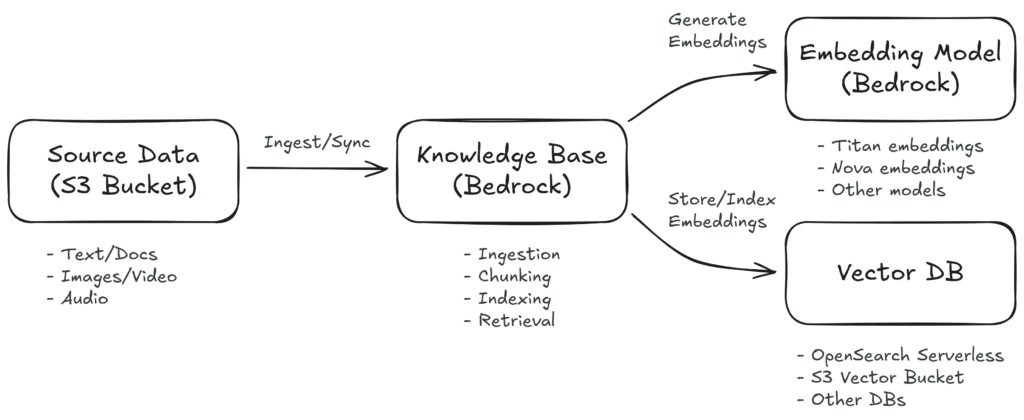
Retrieval-Augmented Generation (RAG) grounds the model in your own data. Instead of guessing (hallucinating), the agent retrieves relevant documents at runtime and uses them as context for its response.
On AWS, a typical RAG setup looks like this:
- Source data stored in Amazon S3 (manuals, PDFs, internal docs, runbooks, videos, photos, audio…)
- Embeddings generated using an embedding model from Amazon Bedrock
- Vector storage using OpenSearch Serverless, S3 Vector Buckets or another vector database
- Retrieval + generation handled by Bedrock Knowledge Bases
The result is an agent that answers questions based on your documentation, not the public internet – with better accuracy, lower hallucination risk, and full data ownership inside your AWS account.
Tools and MCP on AWS
Now that we’ve covered RAG, let’s look at tools.
An AI agent that can access knowledge through RAG becomes much more powerful when it can also invoke tools and interact with systems to perform real actions. This is what distinguishes a chatbot from an AI agent! On AWS, there are several methods for exposing tools that agents can call. These methods focus on enabling agents to execute backend logic, access services, and retrieve or update data securely.
LLMs can’t perform actions – they only predict the next token based on training data from some point in the past. Adding tools to an LLM is what distinguishes a chatbot from an AI agent and allows it to perform actions.
Agents commonly call tools in two ways on AWS:
- Direct API and/or Lambda
Expose backend logic through API Gateway and Lambda, and let the agent call these endpoints directly. - Model Context Protocol (MCP)
Expose tools through a standardized protocol so they can be discovered and reused across multiple agents and frameworks.
Each approach solves the problem in a slightly different way – and there are some overlap. Before we look at how to create agents and add tools using the various methods listed above, let’s first take a scenic detour to better understand the newest kid on the block, MCP.
Model Context Protocol (MCP)
The Model Context Protocol (MCP) is an open specification originally introduced in 2024 to standardize how language models interact with external tools and data sources. It provides a structured way for an agent’s runtime environment to discover and invoke tools through a supported protocol. MCP is increasingly being adopted as a common integration standard by agent runtimes and tool providers.
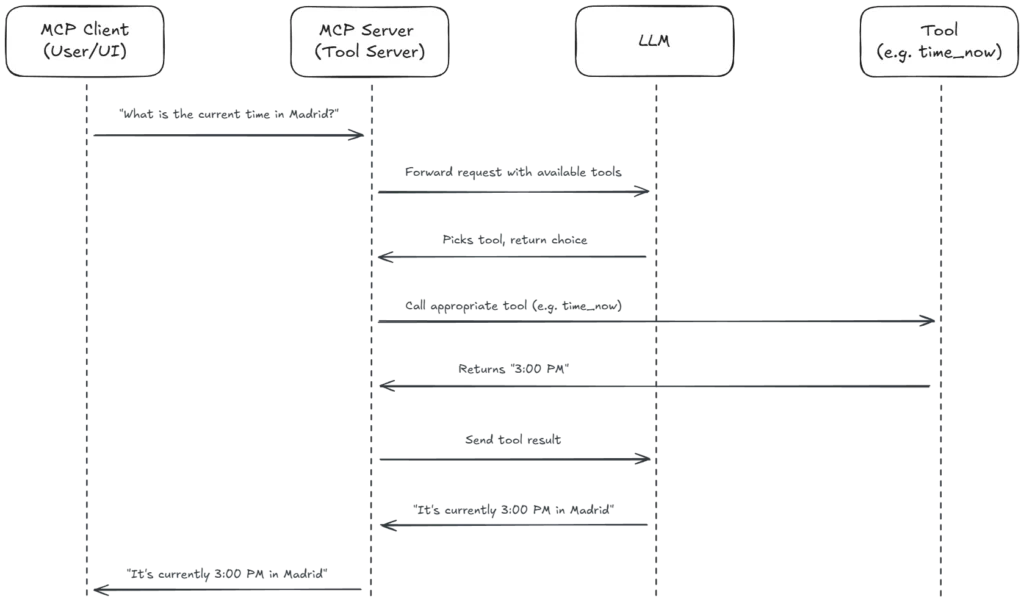
MCP defines a client-server interaction model where:
- An MCP server exposes one or more tools with well-defined operations.
- An MCP client, typically an agent runtime or gateway, connects to this server.
- The agent uses the protocol to list available tools and call them with structured parameters.
This enables agents to call tools with well-defined semantics rather than relying on ad-hoc or prompt-driven function calls.
Putting Everything Together Into an AI Agent
There are two primary ways for startups to build “AI Employees” on AWS. Your choice depends on your team’s technical depth, the complexity of the task, and how much architectural control you want to maintain.
Option 1: The “No-Code” Shortcut (Amazon Bedrock Agents)
For many business use cases – like a support bot that needs to process a return – you don’t need to write custom orchestration code. Amazon Bedrock Agents is a fully managed, declarative service that handles the “heavy lifting” of the reasoning loop for you.
- Define the Goal: You tell the agent what its job is in plain English instructions.
- Plug in Knowledge: Connect a Bedrock Knowledge Base to give the agent private, company-specific context (RAG).
- Give it Tools: Attach Action Groups that use AWS Lambda functions to interact with other services or external APIs.
- Managed Operations: AWS automatically handles session state, content filtering (Guardrails), and infrastructure scaling.
- Best For: Rapid prototyping, standard business workflows, and lean teams who want to move from idea to production in days.
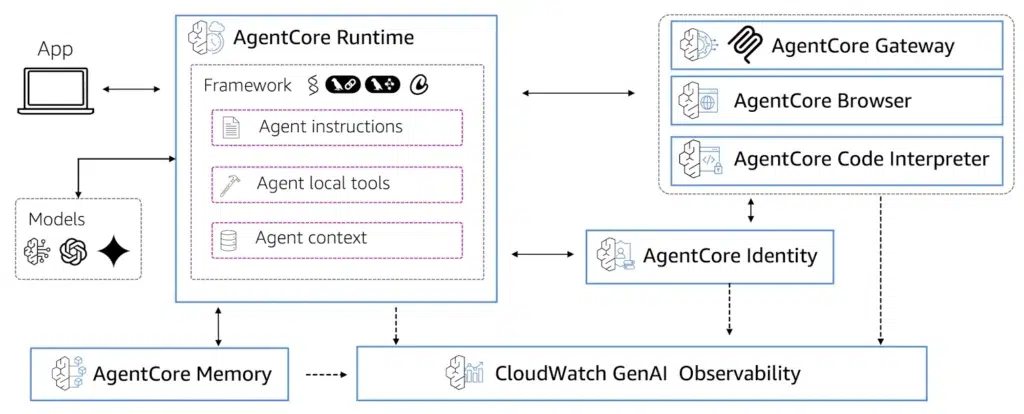
Option 2: The “Code-Driven” Powerhouse (Amazon Bedrock AgentCore)
If your startup is building a proprietary, complex AI product, you need the modular flexibility of Amazon Bedrock AgentCore. Think of AgentCore as a production-grade platform for “professionalizing” agents built with open-source frameworks like Strands, LangGraph, or CrewAI.
- AgentCore Runtime: A secure, serverless environment that supports long-running, asynchronous tasks (up to 8 hours). It uses Firecracker microVM technology to provide total hardware-level isolation for every user session – no one will be able to access your agent data.
- AgentCore Gateway (MCP): Acts as a universal “hub” for your tools. By using the Model Context Protocol (MCP), you can build a tool once and let your agents dynamically discover it using Semantic Tool Discovery.
- AgentCore Memory: A managed system for both short-term context and long-term “episodic” memory, allowing your agents to learn and personalize their behavior over time.
- The Specialist Toolset: AgentCore includes built-in, production-ready components that handle complex tasks out-of-the-box:
- Code Interpreter: A secure sandbox where agents can write and execute Python code for data analysis or math.
- Browser Runtime: A managed, headless browser that allows agents to automate web-based workflows or scrape data from sites without APIs.
- Identity & Policy: Managed authentication (OIDC/SAML) and fine-grained action-level governance using the Cedar policy language.
- Observability & Evaluations: Built-in telemetry via OpenTelemetry and automated quality scoring for agent performance.
- Active Consumption Pricing: A major benefit for startups – you are only billed for active CPU/RAM processing. Costs are paused during “I/O wait” (like when the agent is waiting for an LLM response), potentially cutting compute costs by 30-70%.
- Best For: Complex multi-agent systems, AI-first platforms, and teams that need fine-grained control over security, identity, and custom logic.
What are Agentic Frameworks?
Agentic frameworks are specialized software libraries that provide the “scaffolding” for building AI agents. Instead of writing every line of reasoning and tool-calling logic from scratch, these frameworks offer pre-built patterns for managing the Agent Loop, maintaining state, and orchestrating multiple agents to work together. They allow developers to focus on the agent’s goals and tools rather than the underlying “plumbing”.
Popular frameworks include:
- Strands (AWS): A production-ready, yet beginner-friendly, Python-based framework optimized for minimal boilerplate and native integration with Amazon Bedrock.
- LangGraph (LangChain): A graph-based framework that provides fine-grained control over complex, stateful transitions and decision flows.
- CrewAI: Focuses on “role-playing” patterns where multiple agents collaborate like a professional crew.
- AutoGen (Microsoft): Specialized in multi-agent conversations and complex task-solving patterns.
Creating your first Strands agent is as simple as a few lines of Python (or your preferred language):
from strands import Agent
from strands.models.bedrock import BedrockModel

# Initialize the 'Brain' using Amazon Nova Lite via Bedrock
model = BedrockModel(model_id="amazon.nova-lite-v1:0")

# Create the Agent
agent = Agent(model=model, instructions="You are a helpful startup assistant.")

# Execute a task
response = agent("What are the first steps to deploying an MCP server on AWS?")
print(response)Putting the above agent on AgentCore is also only a few lines of code, thanks to the Bedrock AgentCore Starter Toolkit.
Which AI Path Should You Take?
| Dimension | No-Code: Bedrock Agents | Code-Driven: AgentCore |
|---|---|---|
| Primary Goal | Fast time-to-value | Maximum control and flexibility |
| Technical Skill Required | Low | Medium to High |
| Logic Control | Managed | Code-driven |
| Memory & Context | Session-based | Long-term, persistent memory |
| Tool Integration | OpenAPI, Lambda | MCP, OpenAPI, Lambda |
| RAG & Knowledge | Bedrock Knowledge Bases | Bedrock Knowledge Bases, Other |
| Scalability & Ops | Fully managed by AWS | Serverless, DevOps-friendly, open-source frameworks |
Integrating the AI Agent Into Your Business
A common misconception is that building an “AI Employee” requires building a custom, complex user interface from scratch. For many startups, this is a barrier they aren’t ready to cross.
The beauty of the AWS architecture, specifically using Bedrock Agents or AgentCore, is that your agent can live anywhere. Instead of a custom UI, you can connect your “backend” to the tools your team and customers already use:
- Slack & Microsoft Teams: Turn your agent into a dedicated corporate bot that answers questions directly in your workspace.
- Telegram: A popular, developer-friendly option for rapid prototyping and internal tools without the heavy verification hurdles of other platforms.
- WhatsApp: The gold standard for customer-facing agents. While it requires business verification, the underlying AWS infrastructure remains the same – reliable, secure, and ready to scale.
By decoupling the “Brain” (Bedrock) from the “Interface” (Slack/Telegram), you lower the barrier to entry while keeping your data residency and security firmly within your AWS account.
The AI Employee in Action: A Support Scenario
Imagine a customer reaches out via WhatsApp asking: “I want to upgrade to the Pro plan, but does it support SSO?” Instead of waiting for a human response, your agent jumps into action:
- Reasoning: The agent analyzes the request and identifies it needs both technical info and billing access.
- Knowledge (RAG): It instantly searches your technical docs in S3 to confirm SSO support.
- Action (Tools): It uses an Action Group or MCP to pull the user’s billing ID and initiate the upgrade.
- Observation: It verifies the transaction and replies to the customer in seconds.
By bringing the agent to existing communication tools, you lower the barrier to entry while keeping your data residency and security firmly within your AWS account.
Managing the Risks: Security and Governance
Empowering AI with “agency” is a strategic move, but it requires enterprise-grade guardrails. Mitigate common risks using AWS-native security primitives:
- Hallucinations & Accuracy: Use Retrieval-Augmented Generation (RAG) to ensure the agent only speaks from verified data sources, not its own “imagination”.
- Cost Management: To prevent runaway “cost loops” (where agents might loop through tasks infinitely), implement Rate Limits on API Gateway and monitor token consumption in real-time.
- Strict Permissions: Follow the principle of Least Privilege. Using AWS IAM, we ensure the agent can only access specific S3 buckets or trigger approved Lambda functions – never your entire infrastructure.
- Auditability & Logging: Every thought, action, and tool call is recorded via Amazon CloudWatch and AWS X-Ray, providing a full audit trail for compliance and debugging.
- Safety Guardrails: Deploy Amazon Bedrock Guardrails to filter harmful content, redact PII (Personally Identifiable Information), and enforce brand-safe communication.
From Blueprint to Reality: Deploying in Under 10 Minutes
At Cloudvisor, we don’t just talk about “AI Employees” – we help you hire them instantly. To move from theory to practice, we’ve developed an automated deployment process that handles the heavy lifting of AWS infrastructure for you.
Our Quick Deploy architecture is more than just a chat interface. It is a production-ready RAG (Retrieval-Augmented Generation) stack that:
- Searches private docs in real time: It identifies relevant information from your S3-hosted knowledge base instantly.
- Contextual Injection: It injects only the relevant snippets into the prompt, ensuring accuracy.
- Fact-Grounded Answers: The agent is restricted to answering only from your customer data, providing references for every claim to eliminate hallucinations.
What’s Under the Hood? When you use our deployment guide, you aren’t just getting a chatbot; you are getting a production-grade stack:
- Intelligence: Powered by Amazon Bedrock and the Amazon Nova Lite model.
- Knowledge: An automated Bedrock Knowledge Base that syncs directly from your private S3 document bucket.
- Security: Full IAM roles built with least-privilege access, ensuring your data is protected by AWS-native security policies.
What Does This Demo Deployment Cost?
Building with enterprise-grade AWS services ensures reliability, but we want to be transparent about the underlying resource costs. Based on a typical startup usage of 100 queries per day, here is a breakdown of the estimated costs:
| Service | Daily Cost | Monthly Cost | Notes |
| OpenSearch Serverless | $11.52 | $350.00 | ⚠️ Runs 24/7 even with zero usage |
| Bedrock Nova Lite | $0.60 | $18.00 | Based on 100 queries/day |
| Bedrock Knowledge Base | $0.003 | $0.10 | Vector storage for documents |
| Lambda | $0.003 | $0.10 | 300 invocations/day |
| S3 Storage | $0.001 | $0.02 | 1GB documents + UI files |
| CloudFront / API Gateway | $0.00 | $0.00 | Within AWS Free Tier |
| TOTAL | ~$12.13 | ~$368.00 |
By using this automated approach, you skip the weeks of manual configuration.
Executive Summary: Hiring Your Digital Workforce
Transitioning from a basic chatbot to an AI Employee is the key to unlocking real ROI from Generative AI. Whether you are building a simple internal assistant or a complex, customer-facing product, the AWS ecosystem provides a path:
- The Foundation: Use Amazon Bedrock to access world-class “Brains” (LLMs) like Amazon Nova or Claude Sonnet 4.5.
- The Knowledge: Ground your agents in reality using RAG and Bedrock Knowledge Bases to eliminate hallucinations.
- The Action: Connect to your business systems using Action Groups for simple tasks or the Model Context Protocol (MCP) for a standardized, reusable toolset.
- The Deployment: Choose Bedrock Agents for speed and no-code simplicity, or Bedrock AgentCore for the ultimate “Code-Driven” power, persistent memory, and cost-efficient active consumption pricing.